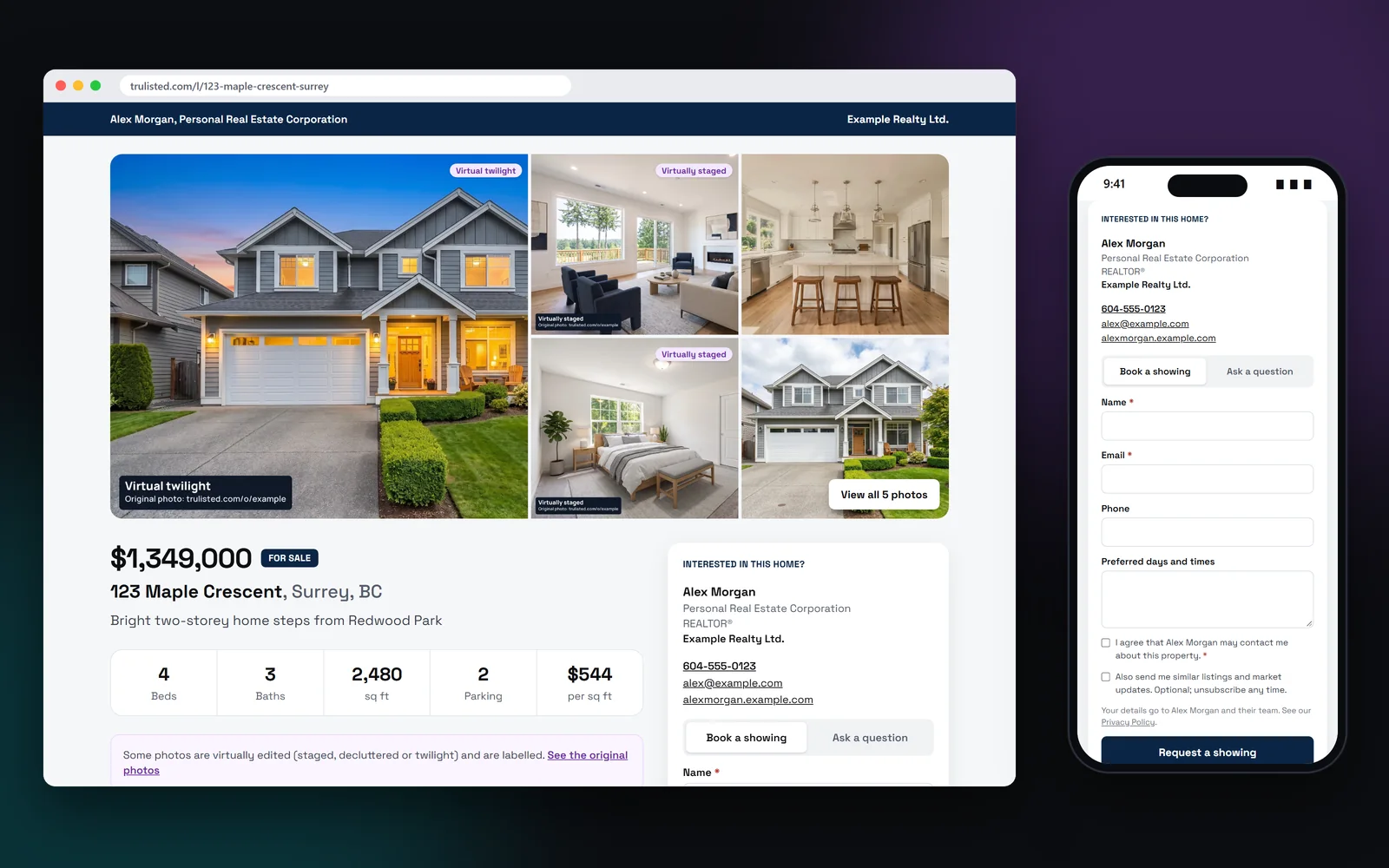
What's on a single-property website
Each page is built from the listing you already made:
- A photo mosaic with a full-screen viewer and captions
- Price and status, and a stats bar: bedrooms, bathrooms, size, parking and price per square foot
- Highlights, the description and a property details table, with land details when filled in
- A floor plan section with room sizes, once you've checked the measurements and the seller has agreed
- Strata or HOA rules, shown as bylaw facts
- A map with your chosen nearby places, distances and directions links
- The original photo for every edited one
- Your name, photo, brokerage and contact details from your brand kit
- “Share this home” buttons for Facebook, X, WhatsApp, LinkedIn, email, text and more
- A small “Made with trulisted.com” credit in the footer
A lead form that follows your campaign
The contact form stays in view as buyers scroll, and it changes with the listing's campaign:
- Just listed: book a showing or ask a question
- Open house: RSVP with a calendar file, or book a private showing
- Coming soon: “Tell me when it's listed”
- Sold: “What's my home worth?”, for neighbours thinking of selling
- Every form asks for consent to contact, with an optional opt-in for listings and market updates
An easy web address for every listing
Each listing website gets an address made from its street and city, such as trulisted.com/l/123-maple-crescent-surrey. It's easy to read out, type and share. Change it any time on the Listing website tab. An old address sends visitors to the new one, and printed QR codes keep working.
Connect your own domain to your agent website, and your listing websites move there too, like www.janedoe.com/l/123-maple-crescent-surrey.
Page views, QR scans and leads in one place
The Listing website tab shows views, visitors, QR scans and leads for the page. Scans from the QR code on your sign or flyer are counted separately, and leads that came by QR are marked. Each lead also goes to your Leads page, with an email alert where your reply goes straight to the buyer.
Share those numbers with your seller in a seller update. Need to pause? Take the page offline and publish it again later.
Edited photos stay honest on the page
Staged, twilight, Blue sky and decluttered photos keep their burned-in labels in the gallery, and the unaltered original appears on the same page, marked “Original”. Renovation concepts stay out of the gallery, in their own “Renovation ideas” section with a disclosure. That's what California's AB 723 asks for, and it's good practice everywhere. Only one version of each photo is shown, so buyers aren't confused by duplicates. Strata rules appear only as facts, and places of worship are left out of nearby places.
From upload to download in minutes
- 01
Create the kit
Photos, copy and AI edits are made for the listing as usual.
- 02
Publish the page
Open the Listing website tab and publish. The page gets a web address made from the street, and a QR code.
- 03
Point your marketing to it
Remake the flyer, email and reel, and their QR codes open the page.
- 04
Follow up on leads
Showing requests, questions and RSVPs reach your Leads page with an email alert.
Built to help you follow the rules
Altered photos keep their labels, and the unaltered originals are shown on the same page, as California's AB 723 requires. Strata and HOA rules appear only as bylaw facts, places of worship are left out of nearby places, and a sold price stays hidden unless you choose to show it. Every lead form asks for consent to contact, and marketing opt-in is a separate, optional box. Read more: the complete listing marketing kit.
How Trulisted handles compliance →Listing websites: questions agents ask
What is a single-property website?
A web page for one listing, with its own link. It shows the photos, facts and location, and lets buyers contact the listing agent. Trulisted makes one for every listing.
Is the listing website included in every plan?
Yes, including your free first listing. It comes with the lead form, the QR code and page stats.
Can buyers book a showing from the page?
Yes. They can request a showing, ask a question or, during an open house campaign, RSVP. You get each request on your Leads page and by email.
Does the page show the sold price?
Only if you choose to. When you mark a listing sold, the price stays hidden unless you opt in, with a reminder about seller consent and your board's rules.
Can I take a listing website down?
Yes. Take it offline from the Listing website tab. The link and QR code stop working until you publish again.
Can I change the listing website's web address?
Yes. Edit the name on the Listing website tab, using letters, numbers and dashes. Old links and printed QR codes keep working and open the page at its new address.
Works well with
See all features →- QR codes and scan tracking →A QR code for your sign and flyer that counts scans and marks the leads it brings in.
- Leads in one place →Every request from your listing websites, QR codes, open houses, website and card, with consent recorded and sent to your CRM.
- Listing campaigns →Coming soon, open house, new price and sold versions of your flyer, email, reel, posts and page.
- Original Photos page →A public page that shows each edited photo beside its original, linked from every label.
- Your own domain →Put your agent website and listing websites on a domain you own, like www.janedoe.com, with secure https.
Try it on your next listing, free
Your first listing is free. No credit card needed.
Create your first listing free