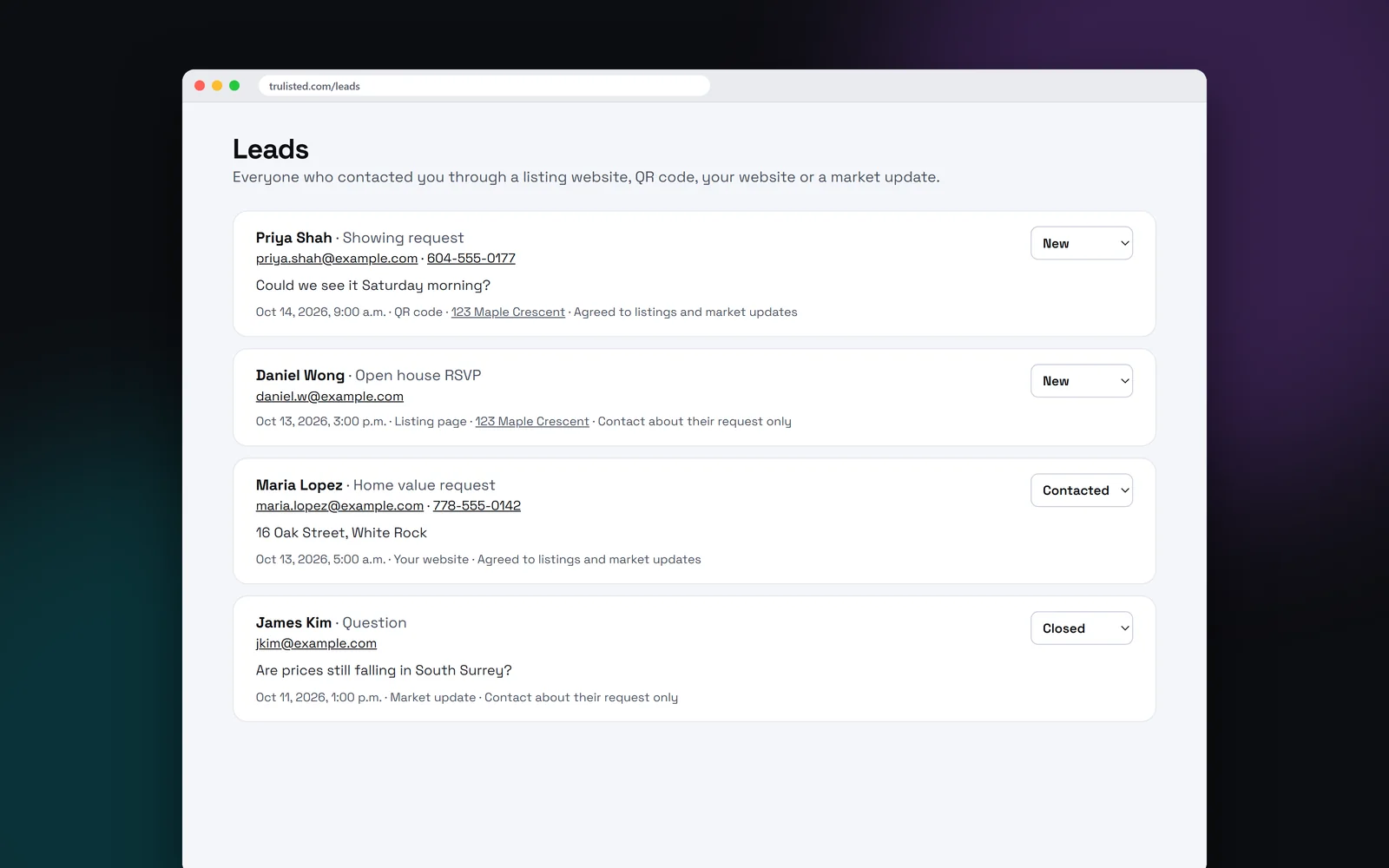
Where your real estate leads come from
Trulisted forms sit wherever buyers and sellers find you. Each lead shows its source, so you can see which marketing works. Share buttons on your listing websites, market updates and agent website make each page easy for you and your visitors to pass on.
- Listing websites: showing requests, questions, open house RSVPs, “tell me when it's listed” and home value requests
- QR codes on signs and flyers, marked so you know the sign is working
- Your agent website: buying, selling and home value questions
- Market update pages, set to home value requests
- Open-house sign-in, with each visitor's answers
- Your affordability calculator, with the buyer's budget
- Your digital business card
Consent recorded with every lead
Every form asks the person to agree that you may contact them about their request. A second box, unticked by default, lets them opt in to similar listings and market updates. The Leads page shows which they chose: “Agreed to listings and market updates” or “Contact about their request only”.
The exact wording each person agreed to is saved with the lead, with the date. If someone asks you to stop emailing them, mark “They asked to stop”, and the Leads page and the download show it.
That record helps with CASL and CAN-SPAM when you decide who to add to your newsletter.
Spam protection and fast alerts
Forms use bot protection and rate limits, so your list fills with people, not scripts. When a real request comes in, you get an email with the person's details, what they asked for and the listing. Reply from your inbox and it goes straight to them. The alert also says if they came by QR code and whether they opted in to marketing.
Simple lead tracking
Each lead has a status: new, contacted or closed. Change it as you follow up, and the list stays tidy. Tap the email address or phone number to reach them. Leads stay private to your account, and sellers only ever see totals in their seller updates.
Send every lead to your CRM
Use Follow Up Boss, Lofty, BoldTrail (kvCORE), Real Geeks, GoHighLevel or another CRM? In Settings → Leads, add your CRM's lead email address, a webhook (for Zapier, Make or GoHighLevel), or both. Every new lead from every form then goes there too, with its source, the listing, the visitor's answers and whether they agreed to marketing.
Press “Send a test lead” to check it works. If a lead ever doesn't get through, Settings → Leads says so and “Send again” resends it. You can still download all your leads as a CSV file, with each person's consent, when they agreed and whether they asked to stop.
Step by step
- 01
Publish your pages
Start with a listing website. Your agent website and market updates add more forms.
- 02
People send a request
They choose what they want and agree that you may contact them.
- 03
You get an alert
An email says who, what and which listing. Reply, and it goes to them.
- 04
Track it
Mark each lead new, contacted or closed on your Leads page.
Built to help you follow the rules
Every form requires consent to contact before it can be sent, and marketing opt-in is a separate, optional box. The Leads page records which one each person chose. Sellers see totals only, never a buyer's details, and forms use bot protection and rate limits.
How Trulisted handles compliance →Leads: questions agents ask
How do I capture leads from my listings?
Publish the listing website and put its QR code on your sign and flyer. Buyers can request a showing, ask a question or RSVP, and each request lands on your Leads page.
Do I get notified of new leads?
Yes. You get an email alert for each request, and your reply goes straight to the person.
Can I add leads to my newsletter?
Only those who opted in to listings and market updates, which the Leads page shows. The others agreed to be contacted about their request only.
Does Trulisted connect to my CRM?
Yes, to any CRM. Add its lead email address or a webhook in Settings → Leads, and every new lead goes there too. You can also download your leads as a CSV file.
Is lead capture included in every plan?
Yes. Every listing website has a lead form, including your free first listing. The agent website comes with paid plans, and market updates with Pro and Group.
Works well with
See all features →- Listing websites →A page for every listing at an easy web address, with photos, a map, the originals and a lead form that follows the campaign.
- QR codes and scan tracking →A QR code for your sign and flyer that counts scans and marks the leads it brings in.
- Open-house sign-in →Visitors sign in with a QR code or on your tablet, and each one becomes a lead with their answers.
- Your agent website →Your own site at yourname.trulisted.com or your own domain, with your listings, past sales, reviews, neighbourhood pages and a home value form.
- Market updates →Paste your board's monthly stats and get posts, an email and a page that brings in leads.
Try it on your next listing, free
Your first listing is free. No credit card needed.
Create your first listing free