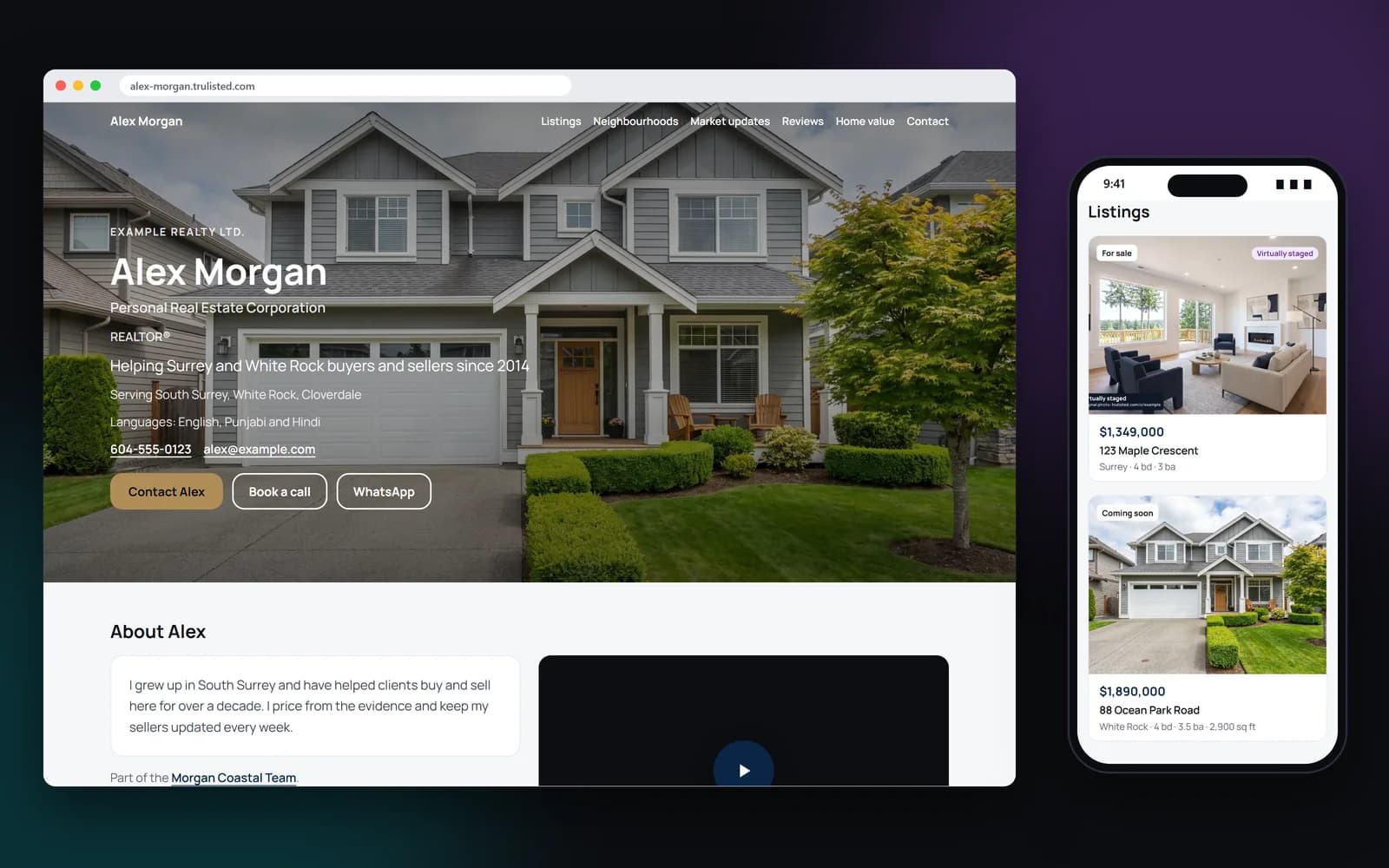
What's on your agent website
Your site pulls together what you already have:
- Your name, headshot, logos, brokerage and contact details from your brand kit
- A headline, your bio and the areas you serve
- Your active listings, linked to their listing websites
- Your recently sold homes, including past sales you add by hand
- Your shared market updates, on Pro and Group
- Client reviews with stars and photos, plus your top Google reviews, shown live from Google
- Neighbourhood pages with your guide to each area and your listings there
- A “Book a call” button, WhatsApp, the languages you speak and a short intro video from YouTube or Vimeo
- A “What's my home worth?” section that sends home value requests to your Leads page
- A contact form for buying, selling or other questions
- On the Group plan, a team page with your agents
- “Share this website” buttons and a small “Made with trulisted.com” credit in the footer
10 website designs, in your colours and fonts
Choose from Classic, Modern, Luxury, Coastal, Urban, Heritage, Minimal, Bold, Editorial and Friendly. Set a primary colour for the header, buttons and prices, and a secondary colour for accents and review cards, from your brand kit, an 18-colour palette or a custom colour. Text colours adjust for contrast on their own, so your site stays readable.
Then make it yours: pick one of 9 font pairs, square or rounded corners, a light, white, warm, tinted or dark background, and a photo across the top. Choose the top photo yourself, from your listing websites' unaltered photos or one you upload. A live preview shows each change on desktop or phone.
Your listings, and your track record
There's nothing to upload twice. Every listing you created with a published listing website can appear on your agent website, and sold listings show under “Recently sold”. Edited photos keep their labels on your site, and the photo at the top is always an unaltered one.
New to Trulisted? Add past sales and other listings by hand: the address, price, rooms, size, sold date, a photo and a link. A sold price stays hidden unless you choose to show it, an edited photo gets its label, and a sale with another brokerage shows “Listed with …”. Your website doesn't include an IDX feed of other brokerages' listings.
Reviews with stars, photos and Google
Add up to 30 reviews from real clients, each with its stars, the client's name, a detail such as “Sold in White Rock, 2025” and a photo if they agreed to it. Put them in the order you like. Reviews must be real, from real clients, shared with their permission.
You can also show your Google reviews. Find your business in Settings → Website → Reviews, and your site shows Google's top 5 reviews, your rating and a link to all of them on Google Maps, loaded live from Google. Your own review list never shows an average star rating. You choose which of your own reviews appear, so an average would only count the ones you picked.
Neighbourhood pages that help you show up in search
Add a page for each area you know well, up to 20, at addresses like yourname.trulisted.com/areas/white-rock. Each page has your guide to the area, a photo, your listings there, your market updates for it and a home value form. Each one has its own search title and description, and goes into your website's sitemap, so people searching for a neighbourhood can find you.
Booking, WhatsApp, languages and an intro video
Add a link to your booking page, such as Calendly, for a “Book a call” button, and your WhatsApp number for a WhatsApp button. List the languages you speak, and they show at the top of your site. Paste a YouTube or Vimeo link to show a short video of you beside your bio. Nothing loads from YouTube or Vimeo until a visitor presses play.
Use your own domain
Already own a domain, like janedoe.com? Connect it in Settings → Website → Domain. Trulisted shows you the records to add where you bought the domain, checks them and sets up a secure https address. Once it's live, your website, its neighbourhood pages and your listing websites open on your domain, and search engines are told it's your main address. Your yourname.trulisted.com address keeps working.
A team page for Groups
On the Group plan, a manager can add a team page at yourname.trulisted.com/team. It shows each agent in the Group who has a live website, with their photo, title and areas and a link to their site, and each agent's site links back to it. Agents can choose not to appear.
A monthly report of your visits and leads
On the 1st of each month, you get an email with last month's numbers: visits to your website and its neighbourhood pages, views of your listing websites and market updates, QR code scans, and new leads, with home value requests counted on their own. Settings → Website shows the last 30 days at any time. Visits are counted without cookies, and you can turn the email off in one click.
Plans, your address, and what happens if you stop
The agent website comes with Starter, Pro and the Group plan. Your address is yourname.trulisted.com, using 3 to 40 lowercase letters, numbers and dashes, and you can add your own domain. The site is public only while you're on a paid plan. If your plan ends, the site and its contact form pause and your own domain is disconnected. They go live again when you choose a plan. You can also set it up before you choose a plan, and it goes live when you do.
Step by step
- 01
Choose your address
Pick yourname.trulisted.com. Own a domain? Connect it too.
- 02
Pick a design and style
10 designs, your colours, fonts, corners, background and top photo. Preview on desktop or phone.
- 03
Add your words
A headline, a short bio, client reviews, neighbourhood guides, a booking link, WhatsApp, your languages and a video.
- 04
Turn it on
Your published listings and market updates appear automatically. Add past sales by hand.
Built to help you follow the rules
Your headline, bio, areas, reviews, neighbourhood guides and team introduction go through the same fair-housing and human-rights wording check as your listing copy, so phrases that describe buyers or who an area suits can't go live. You confirm each review is real and shared with permission, and that a client agreed to their photo. Stars show one review at a time, never as an average. Your brokerage name always shows, edited listing photos keep their labels, and only an unaltered photo can sit at the top. Listings you add by hand ask you to confirm you may advertise them, keep sold prices hidden unless you choose, and label edited photos. Every form asks for consent before anyone can send a request.
How Trulisted handles compliance →Agent website: questions agents ask
Do I need a website as a real estate agent?
Most buyers and sellers look you up before they call. A simple site with your listings, sold homes, reviews and a contact form answers their questions and gives them a way to reach you.
Can I use my own domain name?
Yes. Buy the domain from any domain company, then connect it in Settings → Website → Domain. You add the records Trulisted shows. DNS changes can take up to 48 hours to spread. Your yourname.trulisted.com address keeps working too.
Does the website include IDX listings?
No. It shows your own listings from Trulisted, not an IDX feed of other brokerages' listings.
Which plans include the agent website?
Starter, Pro and the Group plan. It isn't part of the free first listing or One Listing.
What happens to my website if I cancel?
It pauses, along with its contact form, and your own domain is disconnected. It goes live again when you're back on a paid plan.
Can I add listings that aren't on Trulisted?
Yes. Add past sales and other listings by hand, with a photo, the price and a link. Sold prices stay hidden unless you choose to show them, and you confirm you may advertise each one.
Can I add client reviews?
Yes, up to 30. Add real reviews you have permission to share, with the stars the client gave, their name and a photo if they agreed to it. Each one goes through the wording check. You can also show your top Google reviews, loaded live from Google.
What can I write on a neighbourhood page?
Write about places and facts: parks, trails, shops, transit, the kinds of homes and recent changes. Don't describe who lives there or who the area suits, and don't rate schools. The wording check catches common phrases like “family-friendly”.
Does the intro video slow down my site or add cookies?
No. Your site shows a still image with a play button. The video only loads from YouTube or Vimeo when a visitor presses play, and that service may set its own cookies then.
Works well with
See all features →- Your own domain →Put your agent website and listing websites on a domain you own, like www.janedoe.com, with secure https.
- Digital business card →A phone page with call, text, email, WhatsApp and Save contact, a QR code and a lead form.
- Affordability calculator →“How much home can I afford?” with Canadian or US rules, on your own page, and buyers' estimates become leads.
- Brand kit →Your logos, headshot, colours and details on every flyer, post, video and page.
- Leads in one place →Every request from your listing websites, QR codes, open houses, website and card, with consent recorded and sent to your CRM.
Try it on your next listing, free
Your first listing is free. No credit card needed.
Create your first listing free