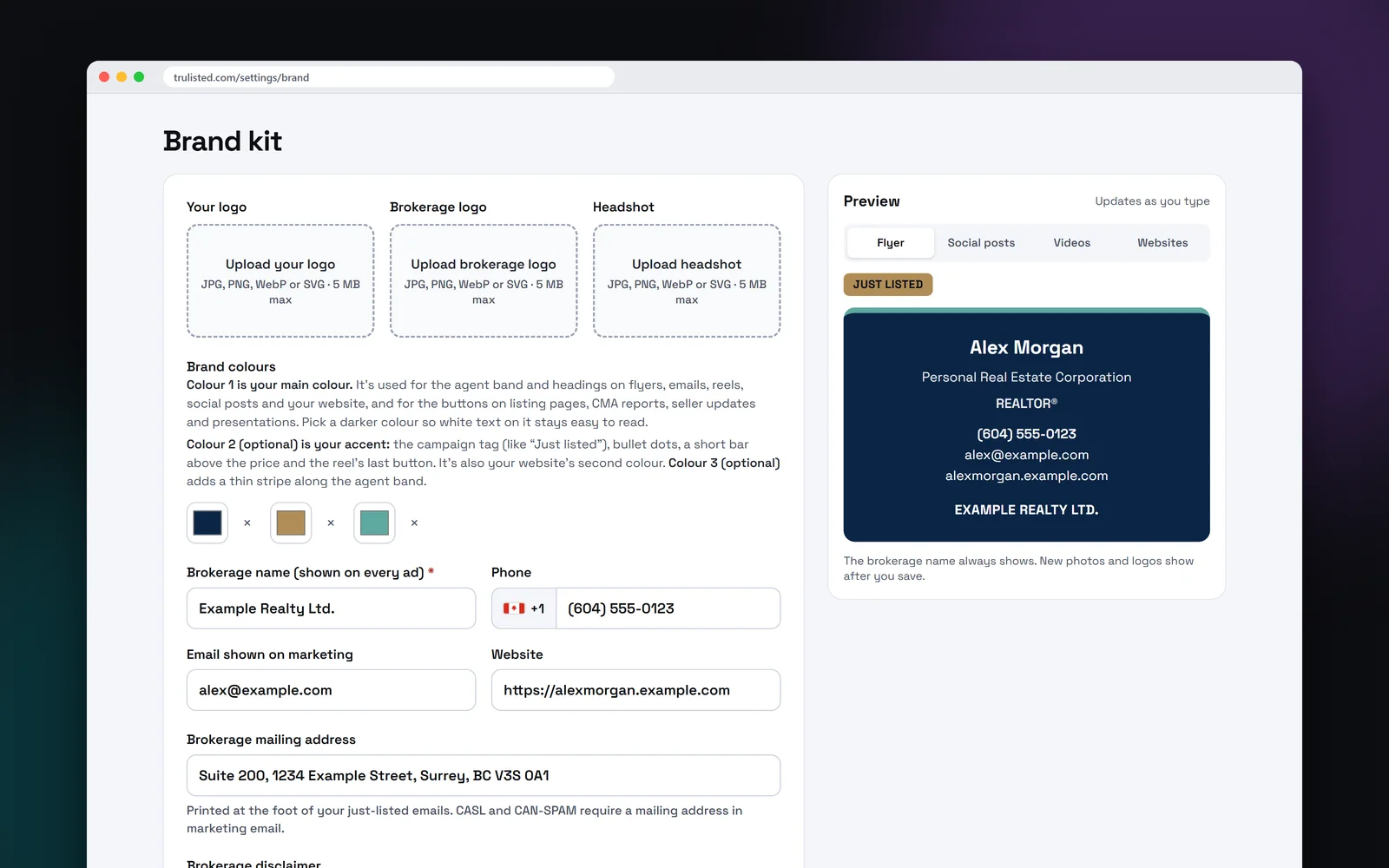
What goes in your brand kit
One place for everything that makes the marketing yours:
- Your logo, your brokerage's logo and your headshot
- On a team or brokerage account, a personal brand set for each agent, picked per listing
- Up to 3 brand colours: a main colour and two accents
- Phone, email and website
- Job title, licence number, and Instagram, Facebook and LinkedIn
- Your brokerage disclaimer
- Video settings: room names and highlights on or off, and up to 5 music tracks you have the rights to
- Writing preferences: words to avoid, words you like and notes for the AI
How your three brand colours are used
Colour 1 is your main colour. It's used for the agent band and headings on flyers, emails, reels, social posts and your website, and for the buttons on listing websites, CMA reports, seller updates and presentations. Pick a darker colour so white text on it stays easy to read.
Colour 2 is your accent. It marks the campaign tag, such as “Just listed”, the bullet dots, a short bar above the price and the button at the end of your reel and video, and it's your agent website's second colour. Colour 3 adds a thin stripe along the agent band on flyers and posts and under the email band, and a ring round your headshot in videos.
- Only one colour? Everything uses it, with no accents.
- If an accent wouldn't stand out on its background, a readable colour is used instead.
- Photo labels stay neutral, so the disclosure always reads the same.
- The live preview shows the accent tag and stripe as you pick them.
Choose what shows on each piece
A flyer has room for more than a story does. The “What to show” table lets you pick, for flyers and emails, social posts, videos and websites, whether your headshot, logo, job title, licence, phone, email, website and social accounts appear. A live preview for each kind of output changes as you type, so you see the result before you save.
Brokerage, corporation and licence details on every piece
Some details aren't optional. Your name and brokerage always show, whatever you choose. Personal Real Estate Corporation wording is used where it applies, and in California your DRE licence number always shows. The download is blocked if the brokerage name is missing. Some of these details come from the base rules and some from the draft rules for your province or state (in review), so check them with your managing broker.
Writing preferences that pass the rules
Tell the AI how you write. Add words to avoid, and the copy is rewritten if one slips in. Add words you like and short instructions. Liked words and instructions must pass the fair-housing wording rules before they save, and the rules always come first. The AI also reads your last 5 or 10 descriptions and avoids reusing their openings, so each listing sounds fresh.
Set your writing voice too: a default tone, three words that describe you, your specialities and a short sample of your own writing, which the AI matches for style (never for facts). The same page sets the languages your marketing uses, and Settings → Website has “Improve my bio”, which rewrites your bio in your voice.
Step by step
- 01
Upload your logos and headshot
Your own logo, your brokerage's logo and a headshot.
- 02
Pick your colours
A main colour and up to two accents, with text colours chosen for readability.
- 03
Add your details
Phone, email, website, job title, licence number and social accounts.
- 04
Choose what shows where
Pick which details appear on flyers and emails, posts, videos and websites.
Built to help you follow the rules
Your name and brokerage always show on every piece, Personal Real Estate Corporation wording is applied where it fits, and in California the DRE number always appears. Writing preferences must pass the fair-housing wording rules before they save. Music needs a rights confirmation before it can be used in a video. Read more: ad rules agents often miss.
How Trulisted handles compliance →Brand kit: questions agents ask
What should a real estate brand kit include?
A logo, a headshot, two or three colours, your contact details and your brokerage's name and logo. Trulisted also keeps your licence number, social accounts, disclaimer and writing preferences.
How are my brand colours used?
Colour 1 is the main colour for the agent band, headings and buttons. Colour 2 is the accent for the campaign tag, bullet dots, the bar above the price and the video's end button. Colour 3 adds a thin stripe along the agent band and rings your headshot in videos.
Can I hide my headshot on some pieces?
Yes. Use “What to show” to choose the details for flyers and emails, social posts, videos and websites separately.
Why does my brokerage name always show?
Most advertising rules in Canada and the US require ads to name the brokerage. Trulisted keeps it on every piece so nothing goes out without it.
Can I add my own music to listing videos?
Yes. Upload up to 5 tracks you have the rights to, confirm the rights, and pick one for each video.
Is the brand kit included in the free first listing?
Yes. Every plan has the full brand kit, including your free first listing.
Works well with
See all features →- Your agent website →Your own site at yourname.trulisted.com or your own domain, with your listings, past sales, reviews, neighbourhood pages and a home value form.
- Flyer maker →A print-ready Letter or A4 flyer with your brand, a QR code and the disclosure line.
- Social posts and stories →Feed posts, a carousel, stories and captions for Instagram, Facebook and LinkedIn.
- Teams and brokerages →The Group plan: every agent's own account and the Pro tools, at CA$37 (US$27) a month per agent.
Try it on your next listing, free
Your first listing is free. No credit card needed.
Create your first listing free