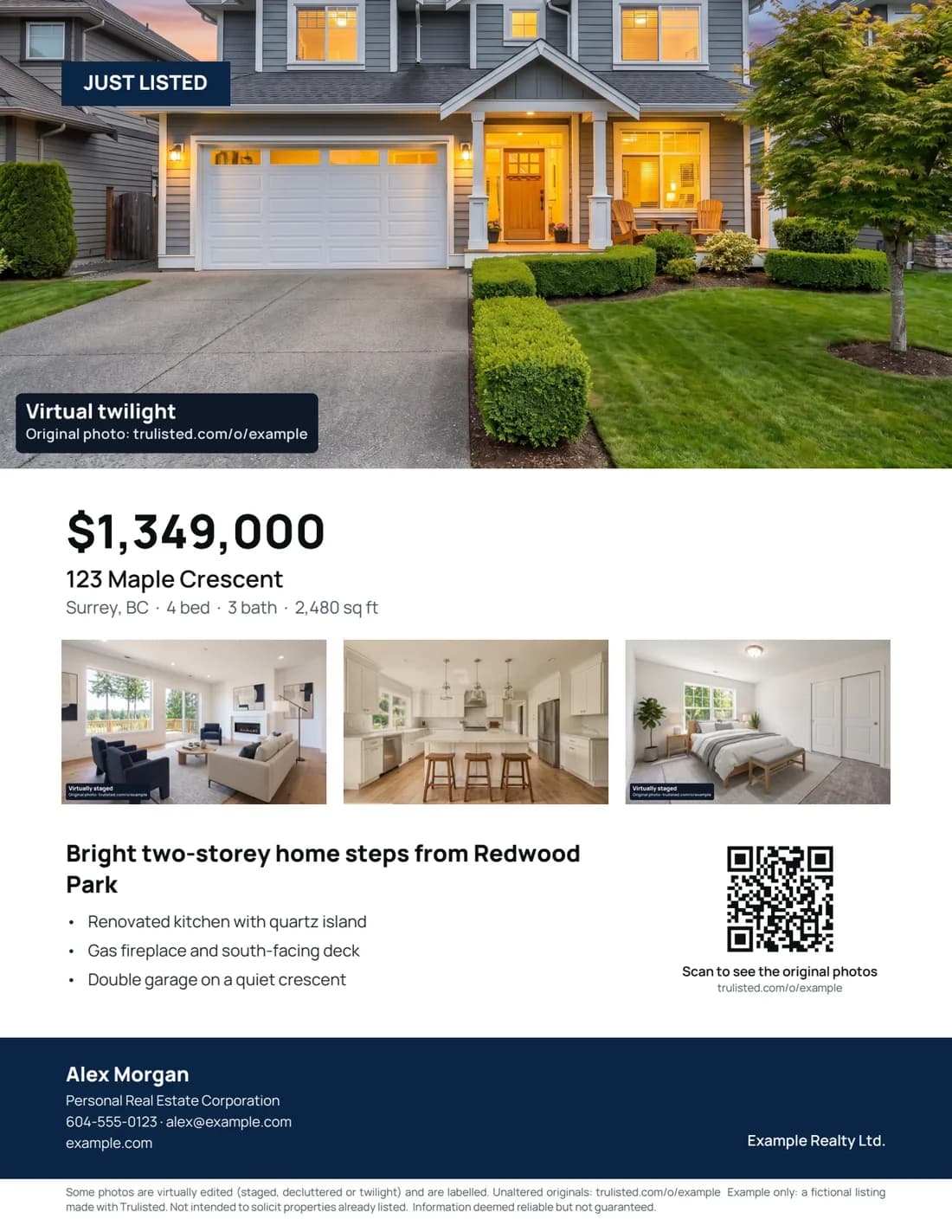
Everything a buyer needs, with the ad details rules often ask for
Your best photos
A hero image and three room photos, chosen from the listing's enhanced and staged results.
Price, facts and highlights
Price, address, beds, baths and size, plus the headline and highlights from your listing copy.
QR code
Opens your listing website once it's published, with the originals beside any edited photos. Before that, it links to the Original Photos page when edited photos are shown, or to your website.
Brokerage and corporation details
Full brokerage name, team name and Personal Real Estate Corporation wording from your brand kit.
Disclosure line
Added automatically when any photo is virtually edited (staged, decluttered, twilight or Blue sky), with the originals link.
Floor plan on page 2
Once you've checked the floor plan and the seller has agreed, it goes on a second page with the room sizes and who measured them.
Your brand colours
The agent band uses your main colour, and your accent colour marks the campaign tag, bullet dots and price, with text colour chosen for readability.
The same listing, as an email that gets opened
Built from the same photos and copy, as table-based HTML that displays properly in Gmail and Outlook.
- Hero photo, highlights and one clear button
- QR code and disclosure line when altered photos are shown
- Your name, brokerage, mailing address and an unsubscribe placeholder
- Copy the HTML into Mailchimp, Constant Contact or your CRM
Writing it yourself? Read the just-listed email that actually gets opened.
Flyer and email questions
What should a real estate flyer include?
A strong hero photo, the price, address, beds, baths and size, three to five key features, your name and contact details, your full brokerage name shown prominently, and a QR code to the listing or photos. If any photo is virtually staged or altered, add a disclosure and a link to the originals.
Do I need a real estate flyer template?
Not with Trulisted. The flyer is laid out automatically from your listing: photos, copy, brand colours and contact details go in the right places for Letter or A4 paper, so there's no template to fill in.
What does the QR code on the flyer link to?
Once your listing website is published, the QR code opens it, and the page shows the original photos next to any edited ones. Before that, a flyer with a staged or altered photo links to your public Original Photos page, as California's AB 723 requires; otherwise it links to your website so buyers can contact you.
Can I send the flyer as an email?
Yes. Trulisted also builds a just-listed email from the same listing: phone-friendly HTML you can paste into Mailchimp, Constant Contact or your CRM, with your name, brokerage and brokerage mailing address, and an unsubscribe placeholder your email tool fills in, for CASL and CAN-SPAM.
Does the flyer follow BC advertising rules?
It's built to help. It uses your full brokerage name, team name and Personal Real Estate Corporation wording from your brand kit, and the download is blocked if the brokerage name is missing. It isn't legal advice, so always check the finished flyer against your brokerage's policies and with your managing broker. See ad rules agents often miss.
Is there a trulisted.com mark on the flyer?
Every flyer has a small “Made with trulisted.com” credit in the corner. On your free first listing, the main photo also carries a faint trulisted.com mark. The photos in your MLS® download never have a mark.
Everything else in the listing kit
See all features →- Virtual staging →Furnish empty rooms, labelled
- Photo editing & twilight →Brighten, declutter, day-to-dusk
- Listing descriptions →MLS-length, wording checked
- Reel maker →9:16 listing video
- Compliance →Labels, originals, ad rules
- Free description grader →Score your MLS remarks
- Examples →Every output from one listing
Your next flyer, ready before the photographer leaves
Your first listing is free. No credit card needed.
Create your first listing free