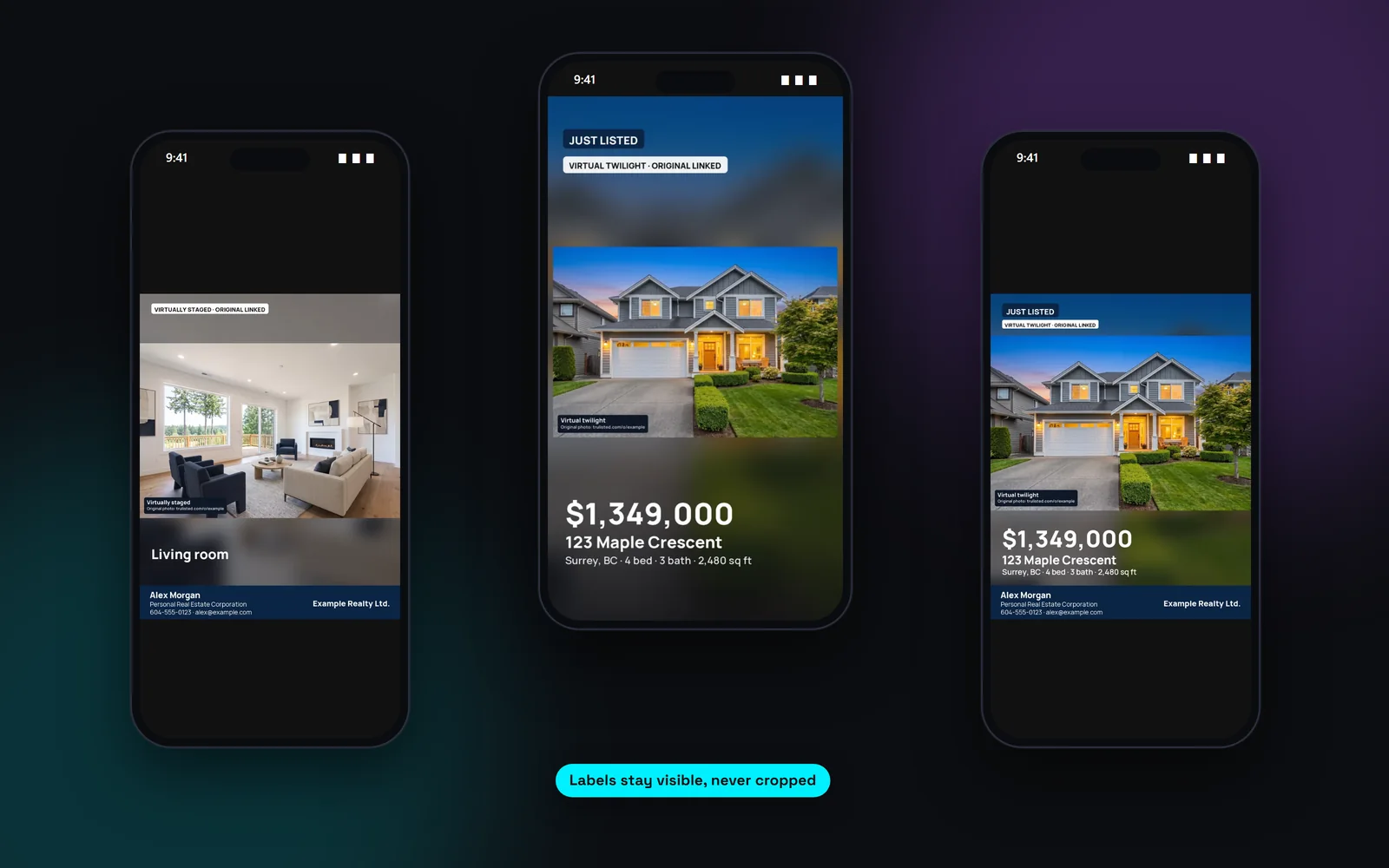
Every social media size for a listing
One listing gives you a full set in your brand colours, with the campaign tag in your accent colour and your brokerage name on every image:
- Feed post, 4:5 (1080×1350), for Instagram and Facebook
- Square post, 1:1 (1080×1080)
- Landscape link image, 1.91:1 (1200×630), for LinkedIn, Facebook and X links
- Carousel: a cover, up to 5 photo slides and an info slide
- Stories in 9:16
- Captions for Instagram, Facebook and LinkedIn to go with them
Captions for Instagram, Facebook and LinkedIn
Each platform gets its own caption, written from your listing facts. It opens with the campaign and address, gives the price and key facts, adds a few highlights and ends with a call to book a showing and your details. Instagram captions include hashtags such as #JustListed or #OpenHouse and your city.
Captions go through the same wording check as your listing copy.
Labels stay visible, even on social
Social media is where edited photos get cropped and reshared. Trulisted shows altered photos whole, never cropped, so the burned-in label stays readable. Your brokerage name is on every image. When an edited photo is used, each caption ends with a disclosure line and a link to the original photos. Keep that line when you post. Trulisted can't stop a repost, but the disclosure travels with the image.
Posts that follow your campaign
When the listing moves from just listed to open house, new price or sold, remake the posts and the tag changes on every image and caption. Open house posts show the dates and times. Sold posts hide the price unless you choose to show it. Campaigns come with every paid plan and with One Listing, and remaking posts uses no credits.
From upload to download in minutes
- 01
Create the kit
Tick social posts on the Create tab.
- 02
Review the set
See every image and caption on the Results tab.
- 03
Download
Save the images, or the whole kit as one ZIP.
- 04
Post it yourself
Upload to Instagram, Facebook or LinkedIn and paste the caption.
Built to help you follow the rules
Altered photos are shown whole so their burned-in labels stay visible, and every image shows your brokerage name. When an edited photo is used, the captions end with a disclosure line and the originals link. Captions go through the fair-housing wording check. Read more: 30 social media post ideas for every listing.
How Trulisted handles compliance →Social posts: questions agents ask
What size should a real estate Instagram post be?
A 4:5 feed post at 1080×1350 takes up the most room in the feed, and stories are 9:16. Trulisted makes both, plus a square post, a carousel and a landscape link image.
Does Trulisted post to social media for me?
No. You download the images and captions and post them yourself, so you choose the time and the account.
Do I need to disclose virtual staging on social media?
Yes. Rules about altered photos apply to your advertising, not just the MLS®. Trulisted keeps the label on the image and adds a disclosure line to each caption.
Can I add my logo and colours?
Yes. Posts use your brand kit: logos, colours, headshot and contact details. In the brand kit you choose which details show on social posts.
Are social posts included in my plan?
Yes, on every plan, including your free first listing. They use no credits. Each image carries a small “Made with trulisted.com” credit, and on the free listing a faint trulisted.com mark too.
Works well with
See all features →- Listing reel and video →A 9:16 reel and a 16:9 video from your photos, with optional cinematic AI scenes and a disclosure frame when it's needed.
- Listing campaigns →Coming soon, open house, new price and sold versions of your flyer, email, reel, posts and page.
- Photo captions →A short, factual caption for every photo, written from what the AI can clearly see.
- Brand kit →Your logos, headshot, colours and details on every flyer, post, video and page.
Try it on your next listing, free
Your first listing is free. No credit card needed.
Create your first listing free