What you get from one paste
One paste gives you everything for the month:
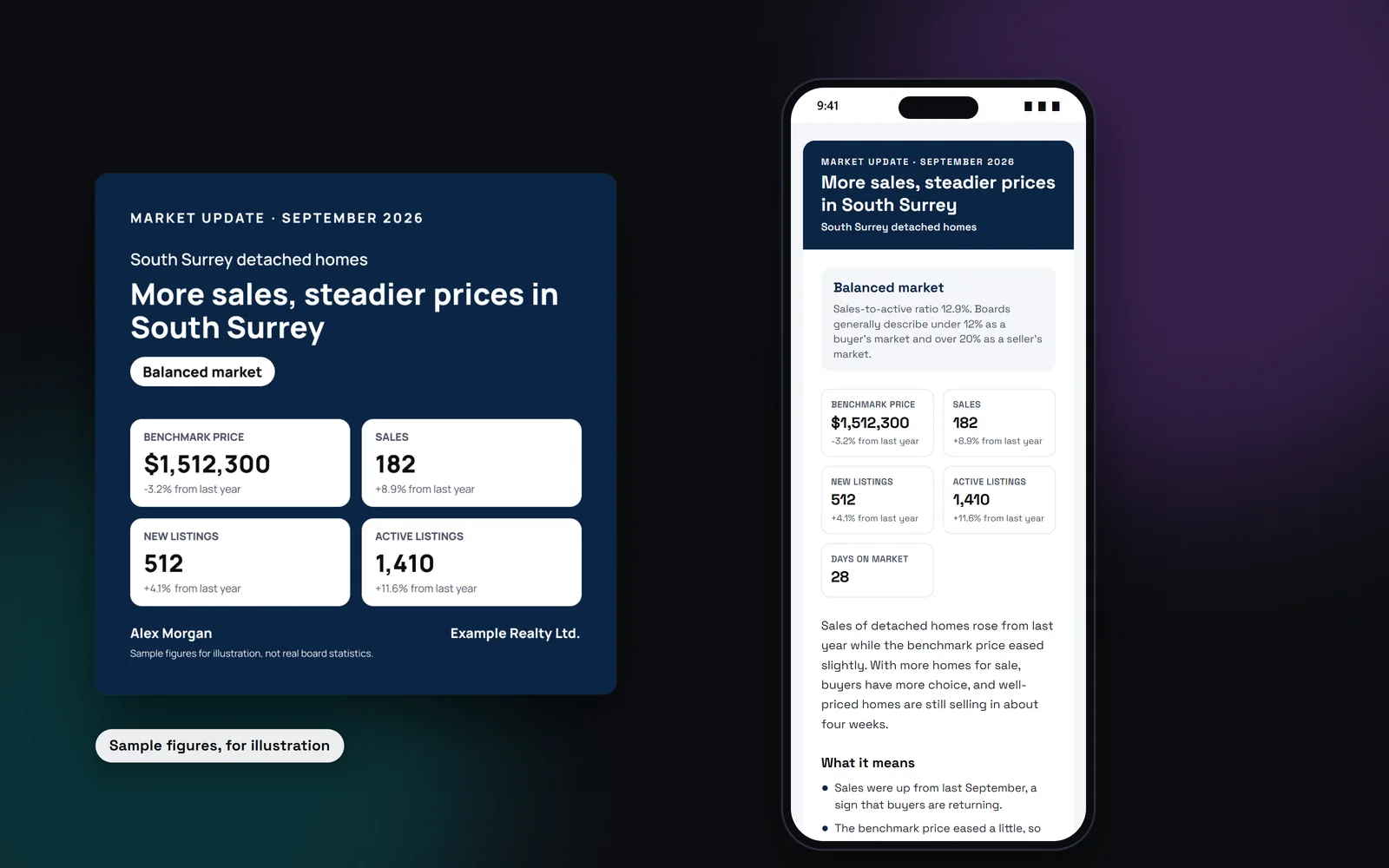
- Up to 8 key numbers, exactly as your board stated them, with the change from last year when given
- The market type from the sales-to-active ratio: buyer's, balanced or seller's
- A headline, a 3 to 4 sentence summary and 3 to 5 takeaways
- A social caption with a few hashtags
- An email to your sphere, with a subject line
- Square and story images in your brand
- A public page with a contact form
Board market reports, posted for you
On Pro and the Group plan, you can also get your board's monthly report without pasting anything. Choose your board when you sign up or in Settings → Account: the board you belong to, and the board whose stats you want on your website if it's a different one. When our team adds that board's report for the month, it's checked and posted to your agent website automatically, and you get an email. You can edit the words or hide it. The board's numbers, source and month stay locked.
Reports are added by hand from the board's published report, so not every board is covered yet.
Facts from your board, no predictions
Trulisted uses only the numbers you paste. The AI is told to copy values as stated and not to guess or fill gaps, so check them before you share. Takeaways explain what the numbers mean together, such as sales rising while prices eased, but they never predict where the market is going or tell anyone to buy or sell. Each update carries a source line with your board and the month.
You can add a line in your own words about what you're seeing at showings.
Buyer's, balanced or seller's market
When your board states the sales-to-active ratio, or gives both sales and active listings, Trulisted shows it and names the market type using the rule of thumb Canadian boards publish: under 12% is a buyer's market, 12 to 20% is balanced, and over 20% is a seller's market. A short note explains the ratio in plain words, so homeowners understand it too.
A market update page that brings in leads
Every update can have a public page with your branding and a contact form, set to home value requests by default. Requests land on your Leads page, marked as coming from a market update. If you have an agent website, your shared market updates can appear there too, building a record of local knowledge month after month. Share the page link in your email and posts so readers can reach you.
Step by step
- 01
Name the area and month
For example, an area and home type, and the month the stats cover.
- 02
Paste the statistics
Copy the numbers from your board's report and paste them in.
- 03
Review the update
Check the key numbers, summary and takeaways, and edit anything.
- 04
Share it
Post the images and caption, send the email and share the page.
Built to help you follow the rules
Numbers are copied as your board states them, with a source line, and the AI is told not to predict prices or give buy or sell advice. You check the numbers before you share. The headline, summary, takeaways, caption and email are checked against the fair-housing wording rules, and a flagged update can't be shared until it's fixed. The page's contact form asks for consent before anyone can send a request.
How Trulisted handles compliance →Market updates: questions agents ask
What should a real estate market update include?
The few numbers that matter, such as the benchmark price, sales, new and active listings and days on market, what they mean together, and an invitation to talk. Keep it factual and skip predictions.
Where do the numbers come from?
From your board's monthly statistics, which you paste in. Trulisted uses only those numbers and adds a source line.
Can I edit the market update?
Yes. Edit the numbers, summary, takeaways, caption and email. The wording is checked again before you share the page.
How do you tell a buyer's market from a seller's market?
By the sales-to-active ratio. Canadian boards generally call under 12% a buyer's market, 12 to 20% balanced, and over 20% a seller's market.
What are board market reports?
On Pro and the Group plan, our team adds your board's monthly report, checks it and posts it to your agent website for you, with an email to let you know. You pick the board in Settings → Account, and you can edit the words or hide the update.
Which plans include market updates?
Pro and the Group plan for teams and brokerages.
Works well with
See all features →- Your agent website →Your own site at yourname.trulisted.com or your own domain, with your listings, past sales, reviews, neighbourhood pages and a home value form.
- Leads in one place →Every request from your listing websites, QR codes, open houses, website and card, with consent recorded and sent to your CRM.
- Social posts and stories →Feed posts, a carousel, stories and captions for Instagram, Facebook and LinkedIn.
- Quick CMA →Paste sold listings and get a price range, a plain-English explanation and a seller report.
Try it on your next listing, free
Your first listing is free. No credit card needed.
Create your first listing free