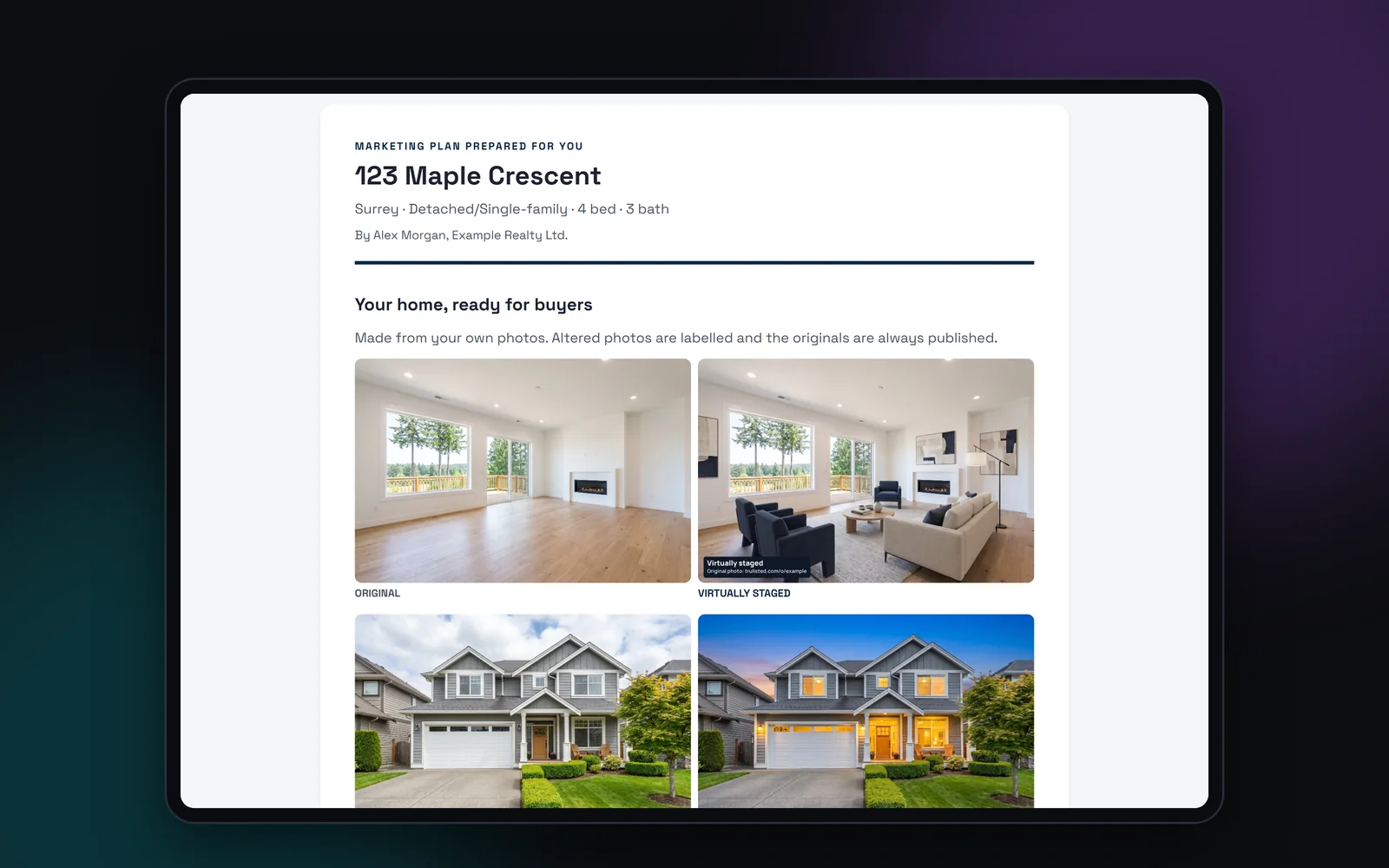
What's in a real estate listing presentation
One private page, built for one seller:
- Up to three previews made from the seller's own photos, with labels on any edited ones
- Your suggested price range from a quick CMA, with the “not an appraisal” note
- How you'll market the home: photo enhancement, staging and twilight, the MLS® description, flyer and email, reel and posts, a listing website and seller updates
- About you, and reviews from past clients
- Your logos, colours and contact details
Previews from the seller's own photos
Generic sample photos don't win listings. Sellers respond to their own living room, brighter and staged. The page puts edited previews first, each with its label, and then enhanced photos. The seller sees what buyers will see, and that every edit is disclosed.
Up to three previews appear on the page. Enhanced photos are free. Staged or twilight previews use credits, like any AI edit.
From presentation to listing in one click
When the seller says yes, tap “I got the listing”. The presentation becomes a Trulisted listing with the same details and photos, so the previews you made are ready for launch day. Nothing is retyped and nothing is lost. Add the rest of the kit, publish the listing website and start the campaign. The seller sees the same photos on launch day that won them over at the meeting.
Private, and checked before you share it
Presentation pages are private links that search engines never index. Before you share one, your bio and reviews go through the same fair-housing and human-rights wording check as your listing copy. A review that says “perfect for young families” has to change before the page goes out. Use only reviews you have permission to share. Your logos and contact details come from your brand kit.
Step by step
- 01
Start a presentation
Choose Listing presentation on the start screen and add the home's details and photos.
- 02
Make previews
Enhance the seller's photos, and stage or add twilight to a few, as you would for a listing.
- 03
Add your pitch
Your CMA range, a short bio and reviews from past clients.
- 04
Share the link
Send the private link or present it on a tablet. Won it? Tap “I got the listing”.
Built to help you follow the rules
Edited previews carry their burned-in labels, and the CMA range shows the “not an appraisal” disclaimer. Your bio and reviews must pass the fair-housing wording check before the page can be shared. Presentation links are private and never indexed. Read more: what to include in a listing presentation.
How Trulisted handles compliance →Listing presentations: questions agents ask
What should a listing presentation include?
Your pricing evidence, your marketing plan, proof of your work and a clear next step. Trulisted adds previews of the seller's own home, which makes the plan concrete.
Can I show staged photos in a listing presentation?
Yes. Stage or add twilight to a few of the seller's photos. Each one carries its label, so the seller sees how disclosure works from the start.
Is the presentation page public?
No. It's a private link, and search engines never index it.
What happens when I win the listing?
Tap “I got the listing”. The presentation turns into a Trulisted listing with the same details and photos.
Which plans include listing presentations?
Pro and the Group plan for teams and brokerages.
Works well with
See all features →- Quick CMA →Paste sold listings and get a price range, a plain-English explanation and a seller report.
- AI virtual staging →Furnish empty rooms in six styles, labelled, with the original photo linked.
- Seller updates →A plain-English activity report for your seller, with an email ready to send.
- Brand kit →Your logos, headshot, colours and details on every flyer, post, video and page.
Try it on your next listing, free
Your first listing is free. No credit card needed.
Create your first listing free