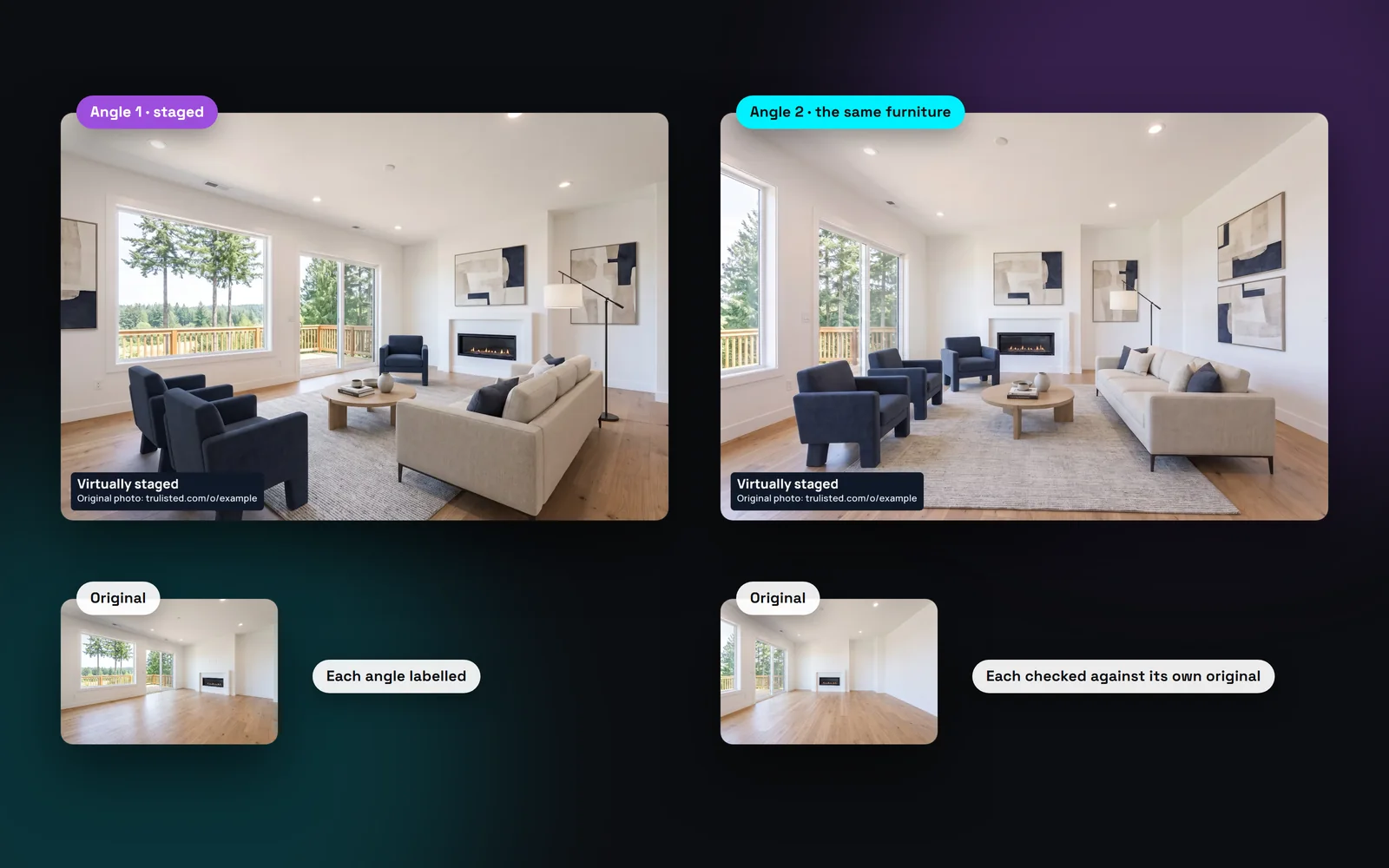
Why mismatched staging hurts a listing
Most rooms are shot from two or three corners. If each photo is staged on its own, the AI picks new furniture every time. One photo shows a grey sofa and the next a blue one. Buyers notice, and the whole listing looks less trustworthy.
Linking angles fixes this. The first photo sets the furniture, and the others follow it. Rooms staged in the same run also share one colour palette, so the whole home looks planned.
How to stage the same room from different angles
On the Create tab, choose the photos and a style. When you stage more than one photo, Trulisted asks: “Same room from another angle?”
- A second photo of a room a home usually has one of, like the living room, is matched to the first one automatically.
- You can change the match, or pick the photo to copy yourself.
- A linked photo waits until its reference photo is staged, then copies the same pieces.
- Each linked photo is one credit, like any staged photo.
Each angle is still reviewed on its own
Matching furniture never relaxes the rules. Every photo goes through the AI honesty review against its own original. Walls, windows, floors, fixtures and views must be unchanged, and doors and walkways must stay clear. A photo that fails is held back and can't be downloaded.
Each staged photo gets its own “Virtually staged” label, and every original goes on the Original Photos page.
From upload to download in minutes
- 01
Pick the photos to stage
Select every photo of the room on the Create tab, and a style.
- 02
Link the angles
Trulisted suggests a match when two photos share a room tag. Or pick the photo to copy yourself.
- 03
We stage the first photo
The other angles wait for it, then copy its furniture into their own view.
- 04
Review and download
Each photo is checked against its own original and labelled.
Built to help you follow the rules
Each angle is a separate altered photo, so each gets its own burned-in “Virtually staged” label and originals link. Every original is published on the Original Photos page. The AI honesty review checks every angle against its own original and holds back any that changed the room. Read more: the best virtual staging software, compared.
How Trulisted handles compliance →Multi-angle staging: questions agents ask
Can I stage the same room from different angles?
Yes. Link the extra photos to the one you want to copy, and Trulisted stages them with the same furniture and colours.
Does each angle use a credit?
Yes, one credit per staged photo. Retries are automatic and free.
Will the furniture be in exactly the same place?
The linked photos copy the pieces and colours of the first one, placed to fit each view. Look over each photo before you use it.
What if one angle doesn't pass the review?
That photo is held back and can't be downloaded. Results held back for honesty problems are never charged. If the review only flags how a photo looks and you choose to use it, it uses 1 credit. You can try again from the Create tab.
Which rooms can be staged?
Living rooms, family rooms, bedrooms, dining rooms, offices, basements and kitchens (stools and accessories only). Bathrooms, hallways, entries, laundry rooms and outside photos aren't staged.
Works well with
See all features →- AI virtual staging →Furnish empty rooms in six styles, labelled, with the original photo linked.
- Full room transformation →A furnished room emptied, then staged, in one step. You get both photos, both labelled.
- Declutter and remove items →Empty a room, clear the clutter, remove a car or bin, or switch off TV screens, with the label and original added.
- Compliance toolkit →Labels, original photos, an AI honesty review and wording checks, with draft rules for BC, Alberta, Ontario and California.
Try it on your next listing, free
Your first listing is free. No credit card needed.
Create your first listing free