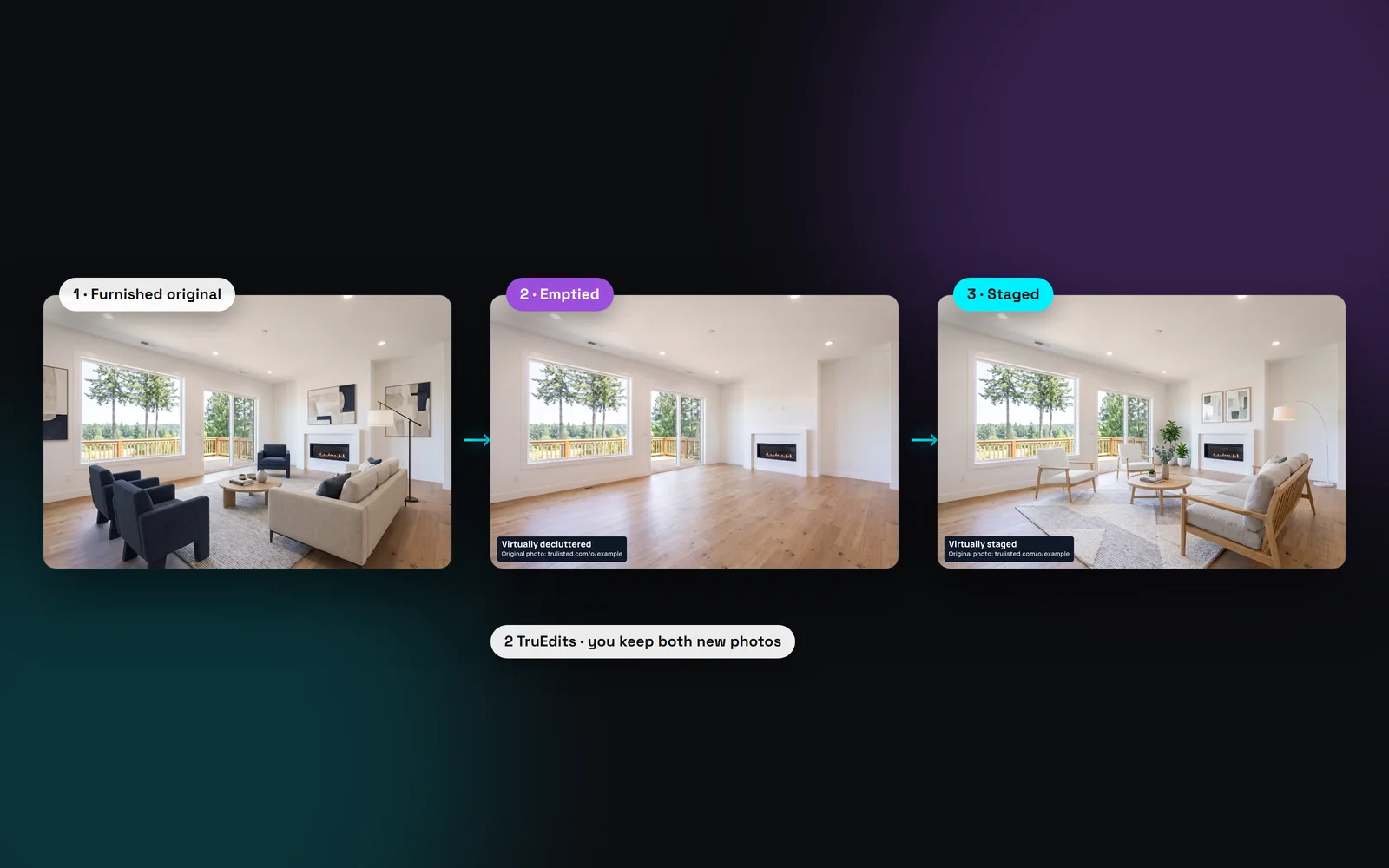
Why you can't just stage over furniture
AI staging adds furniture to open floor. In a furnished room there is no open floor, so new pieces would sit on top of old ones, or the AI would have to guess what to remove. That's how rooms get changed by mistake.
Trulisted only stages empty rooms. If you stage a room tagged “Has furniture” as it is, it's skipped at no charge. Full transformation does the two steps in order instead, with a review after each one.
What you get for 2 credits
One room, two finished photos:
- The emptied room, labelled “Virtually decluttered”. Use it to show the space as a blank canvas.
- The staged room, labelled “Virtually staged”, in your chosen style and colour scheme.
- Both paired with the seller's real photo on your Original Photos page.
- The same staging rules as any room: furniture sized to the room, doors and windows kept clear, and one palette across the listing.
Virtual restaging or decluttering: which to use
Choose Declutter (1 credit) when you only need the empty room, or when a small room reads better bare. Choose Full transformation (2 credits) when the seller's furniture is dated or crowded and you want buyers to see a finished room.
Changed your mind before you generate? “Undo: stage without emptying” takes the room back out. On Starter's 8 credits a month, that's up to four transformed rooms. Pro's 25 a month go further.
What the review checks stays the same
Only movable furniture and decor change. The review checks that walls, ceilings, windows, doors, floors, cabinets, fireplaces and light fixtures match the original. It also checks that heaters, vents and outlets weren't hidden or added. If the emptied photo fails, the room isn't staged, and held results can't be downloaded. Each step gets up to 3 tries, with the reviewer's notes fed back, before anything reaches you.
Virtual renovation: show what new finishes could look like
Some rooms need new finishes, not new furniture. Virtual renovation shows the same room with new paint, flooring, cabinets, countertops or backsplash, in one of 4 looks. You pick which finishes change. Everything else must stay the same, and the honesty review holds back a result where anything else changed.
The result is one image: the current photo on the left and the concept on the right, labelled “Renovation concept, not current condition”. It uses 2 credits. Renovation concepts are kept out of your MLS® photos, flyer, videos and posts. They go in their own folder in the download and in a “Renovation ideas” section on your listing website.
From upload to download in minutes
- 01
Pick a furnished room
Rooms with furniture are flagged when you upload. Choose one for staging and pick a style.
- 02
Choose “Empty and stage it”
Trulisted offers it as soon as a furnished room is picked. It uses 2 credits for the room.
- 03
We empty, then stage
The room is cleared first. If that photo passes the honesty review, the empty room is staged.
- 04
Download both photos
The empty and staged versions are both labelled and linked to the same original.
Built to help you follow the rules
Both new photos carry burned-in labels: “Virtually decluttered” on the empty room and “Virtually staged” on the staged one, each with the originals link. The seller's real photo is published on the Original Photos page next to both. The AI honesty review checks each step, and the room isn't staged if the emptied photo is held back. Read more: honest AI photo edits.
How Trulisted handles compliance →Full transformation: questions agents ask
Can you virtually stage a room that already has furniture?
Yes, with Full transformation. Trulisted removes the movable furniture first, then stages the empty room. Staging straight over furniture isn't offered, because it tends to change the room.
How many credits does a full transformation use?
Two per room: one for the empty photo and one for the staged photo. You keep both.
What if the empty room doesn't pass the review?
The room isn't staged and the held photo can't be downloaded. Results held back for honesty problems are never charged. If the review only flags how a photo looks and you choose to use it, it uses 1 credit. You can try again or choose a different photo.
Do I need to show the original photo?
In California, yes: AB 723 requires a disclosure and a link to the original for altered listing photos. BCFSA also advises labelling altered photos. Trulisted publishes the original and puts the link on both labels.
Which staging styles can I use?
The same six as regular staging: Modern, Scandinavian, Farmhouse, Luxury, Coastal and Industrial, with an optional colour scheme and pieces to leave out.
What is a virtual renovation concept?
The same room shown with new finishes you pick, such as paint, flooring or countertops, beside the current photo. It's labelled “Renovation concept, not current condition”, uses 2 credits, and is never used in your MLS® photos, flyer, videos or posts.
Works well with
See all features →- Declutter and remove items →Empty a room, clear the clutter, remove a car or bin, or switch off TV screens, with the label and original added.
- AI virtual staging →Furnish empty rooms in six styles, labelled, with the original photo linked.
- Same room, every angle →Stage one photo, and other shots of the same room get the same furniture.
- Original Photos page →A public page that shows each edited photo beside its original, linked from every label.
Try it on your next listing, free
Your first listing is free. No credit card needed.
Create your first listing free