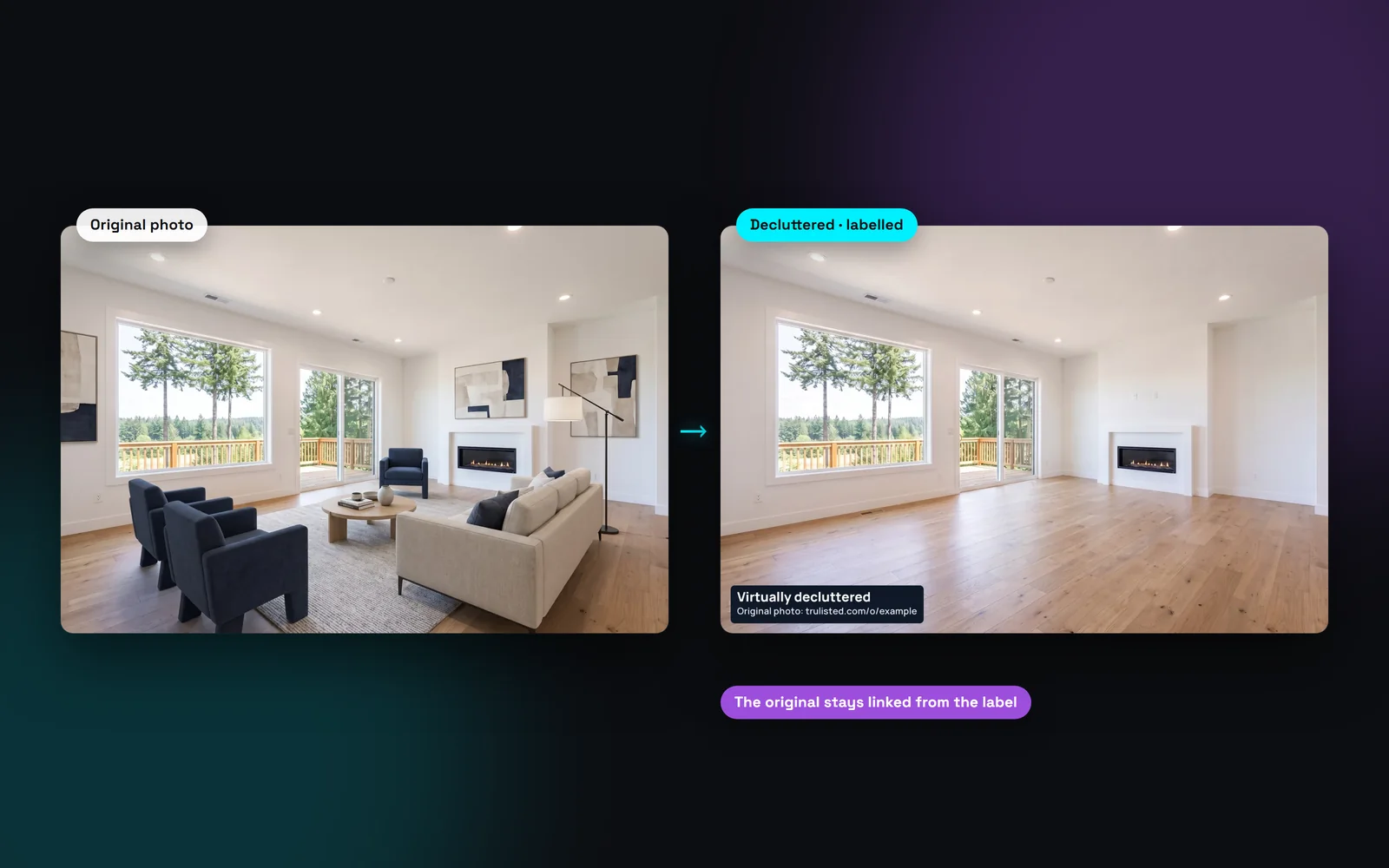
Three ways to declutter a listing photo
Pick the option that fits the photo. Each result is one credit, and retries are automatic and free.
- Everything movable: empties the room so buyers see the floor, walls and windows. Good for a room with a few pieces left, or before staging.
- Clutter only: keeps the furniture and removes small loose items like papers, dishes and toys.
- Specific items: tick what should go, such as cars, garbage and recycling bins, hoses and yard tools, toys, personal photos, countertop clutter, loose cords or temporary signs. You can also type one more item.
- TV screens: tick “TV screens” to show them switched off. It's 1 credit on its own, or nothing extra alongside other items.
What AI object removal will never take out
Some things are part of the home or its setting, and buyers have a right to see them. Trulisted refuses to remove them, even if you type them in. If the AI removes one anyway, the reviewer holds the photo back.
That covers power lines and poles, trees, hedges and fences, neighbouring buildings, roads and views. It also covers anything permanent inside: walls, floors, windows, cabinets, counters and fixtures. Damage such as cracks, stains or leaks always stays in the photo.
Is it legal to remove objects from real estate photos?
Removing temporary things, like a parked car or a bin, is usually fine when the photo is labelled as altered. Removing something a buyer would want to know about is not, even with a label. California's AB 723 asks for a disclosure and a link to the original, and BCFSA advises labelling altered photos in BC.
Trulisted burns “Virtually decluttered” into the photo and publishes the original on your Original Photos page. Check your MLS® board's own photo rules too.
Declutter first, then stage
Rooms with furniture can't be staged as they are. When you pick one for staging, Trulisted warns you and offers two fixes. “Declutter it instead” empties the room for one credit. Full transformation empties it and then stages it for two credits, and you keep both photos.
Both options keep the seller's real room underneath. The walls, floors, windows and fixtures in the result must match the original photo.
From upload to download in minutes
- 01
Pick the photos
Choose up to 10 photos on the Create tab. Rooms with furniture are already flagged for you.
- 02
Choose what to remove
Everything movable, clutter only, or specific items such as cars, bins, toys or cords.
- 03
We edit and review
The AI removes only what you chose. A second AI compares the result with the original and holds back anything that changed the room.
- 04
Use it with the label
The photo keeps its label and originals link on the MLS®, flyer, posts and reel.
Built to help you follow the rules
Every decluttered photo gets a burned-in “Virtually decluttered” label with a short link to the original, and the original goes on the public Original Photos page. An AI honesty review compares each result with its original and holds back any photo where walls, floors, fixtures, damage or the view changed. Permanent things like power lines, trees and neighbouring buildings can't be chosen for removal. Read more: honest AI photo edits.
How Trulisted handles compliance →Declutter: questions agents ask
Can AI remove furniture from a listing photo?
Yes. Choose “Everything movable” to empty the room. The walls, floors, windows and fixtures stay as they are, and the photo is labelled as altered with a link to the original.
How much does it cost to declutter a photo?
One credit per photo. Your free first listing comes with 8 credits, One Listing has 12, Starter has 8 a month and Pro has 25 a month. Retries are free. Results held back for honesty problems are never charged. If the review only flags how a photo looks and you choose to use it, it uses 1 credit.
Can I remove power lines or a neighbour's house?
No. Power lines, poles, trees, fences, neighbouring buildings, damage and views are part of the property or its setting. Trulisted won't remove them, and the review holds back any photo where they disappear.
Do I have to disclose decluttered photos?
In most places, yes, because removing items changes what the photo shows. Trulisted labels each decluttered photo and publishes the original, as California's AB 723 requires and BCFSA advises. Ask your managing broker about local rules.
How many photos can I declutter at once?
Up to 10 photos per run. Each photo can have up to 3 versions of the same edit, so you can try another option if the first isn't right.
Works well with
See all features →- Full room transformation →A furnished room emptied, then staged, in one step. You get both photos, both labelled.
- AI virtual staging →Furnish empty rooms in six styles, labelled, with the original photo linked.
- Photo enhancement and twilight →Every photo brightened, straightened and sized for the MLS® at no cost, plus labelled twilight and Blue sky edits.
- Original Photos page →A public page that shows each edited photo beside its original, linked from every label.
Try it on your next listing, free
Your first listing is free. No credit card needed.
Create your first listing free