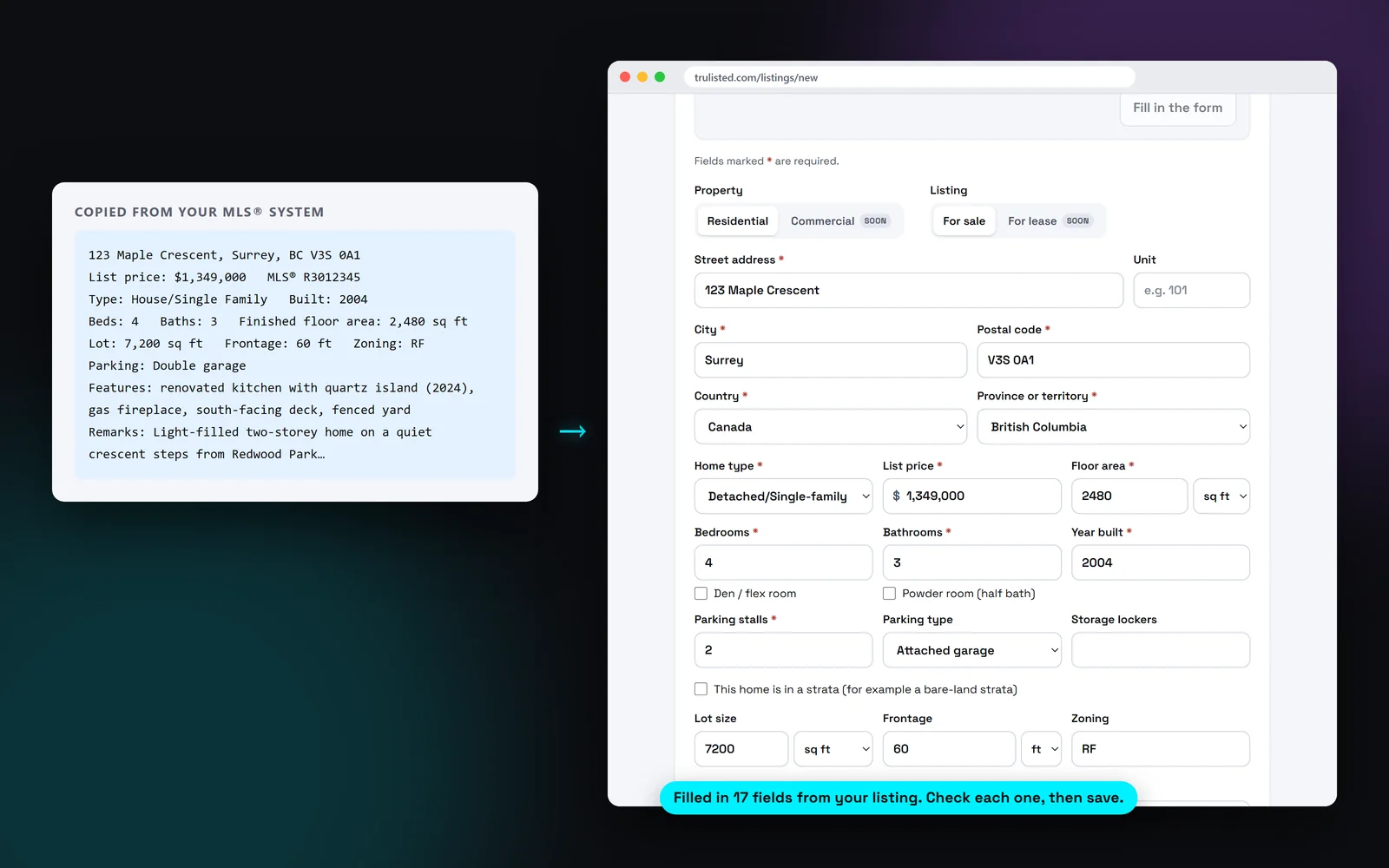
What Paste from MLS® fills in
The AI reads the text and copies only what it states:
- Address, unit number, city, province or state, and postal code
- Home type, price, bedrooms, bathrooms, den and powder room
- Floor area, year built, parking, storage and the monthly strata or HOA fee
- Lot size, frontage and zoning, for homes on their own land
- The MLS® number and board
- Pet, rental and age rules from the bylaws
- Up to 12 short features, such as “gas fireplace” or “renovated kitchen (2024)”
Facts only, no guessing
If a value isn't in the text, the field should stay empty: the AI is told not to estimate a floor area or round up the bedrooms, and you check every field before you save. Selling words like “stunning” or “must see” are left out of the features, and so is anything about who should live there, the neighbours or places of worship.
You can paste a full listing or just the remarks. If you paste only a description, Trulisted fills in only what it states.
Strata and HOA rules, handled carefully
Pet, rental and age rules matter to buyers, but how you word them matters too. Paste from MLS® saves them as bylaw facts, such as “Age-restricted 55+ per strata bylaws”. They appear in the property details and the copy only as facts about the building, never as who the home suits. That helps you keep the wording in line with fair-housing and human-rights rules.
Can I look up a listing by MLS® number?
No. Trulisted doesn't pull listings from REALTOR.ca or a data feed. Copy and paste is quick, and because it reads plain text, you don't need a special export: paste the text from your own MLS® system and the details are ready in seconds.
Prefer to start from scratch? Type the address instead. Google address suggestions fill in the street and city, with the unit number in its own field.
From upload to download in minutes
- 01
Copy the listing
Select the listing in your MLS® system and copy it, remarks included.
- 02
Paste it into Trulisted
Start a new listing and choose Paste from MLS®.
- 03
Check the fields
About 20 fields fill in within seconds. Anything not stated is left blank.
- 04
Add photos and create
Upload the photos. The description is written fresh from the facts.
Built to help you follow the rules
Only facts stated in the pasted text are meant to be copied, and the AI is told not to guess, so check each field before you save. Strata and HOA rules are saved as bylaw facts, and wording about who should live there, neighbours or places of worship is left out. The listing copy written afterwards still goes through the fair-housing wording check.
How Trulisted handles compliance →Paste from MLS®: questions agents ask
How do I import a listing from the MLS®?
Copy the listing text from your MLS® system, start a new listing in Trulisted and choose Paste from MLS®. About 20 fields fill in within seconds. Check them, then save.
Does it copy my old listing description?
No. It copies facts and up to 12 short features. Trulisted then writes a new description from those facts, in the tone you choose, and checks the wording.
What if a field is wrong or missing?
Edit it before you save. Anything the text doesn't state stays blank, so you only fill in the gaps.
Does it work for US listings?
Yes. It reads Canadian and US listings, with the province or state, the postal or ZIP code, and sizes in square feet or square metres.
Does Paste from MLS® cost anything?
No. It's free on every plan, including your free first listing.
Works well with
See all features →- Listing description generator →MLS® remarks, a headline and bullets written from your facts in five tones, with the wording checked.
- Photo captions →A short, factual caption for every photo, written from what the AI can clearly see.
- Listing websites →A page for every listing at an easy web address, with photos, a map, the originals and a lead form that follows the campaign.
- Fair housing words checker →Paste any listing or ad and see the risky words, with safer wording for each. Free, no sign-up.
Try it on your next listing, free
Your first listing is free. No credit card needed.
Create your first listing free