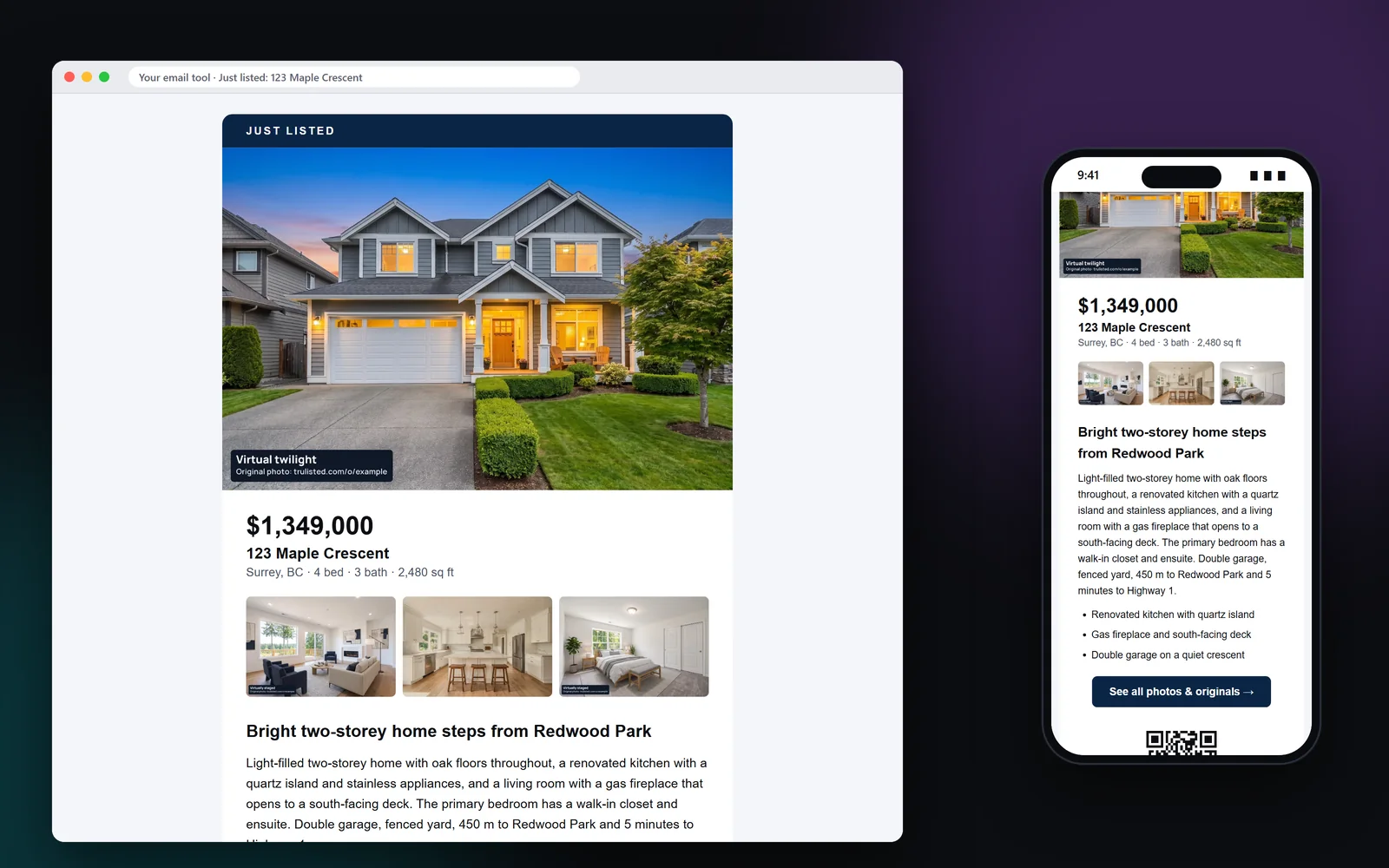
What's in the just listed email
It's built as table-based HTML, so it looks right on phones and in Gmail and Outlook:
- Your hero photo, the price, address and key facts
- The headline and highlights from your listing copy
- One clear button, such as “Book a showing”
- A QR code and a disclosure line when edited photos are shown
- Your name, contact details and brokerage in your brand colours, with your accent colour on the campaign tag
- Your brokerage mailing address, your disclaimer and an unsubscribe placeholder for your email tool
Just listed emails and CASL: what agents need
Canada's anti-spam law (CASL) and the US CAN-SPAM Act both expect a commercial email to say who it's from, give a mailing address and offer a way to unsubscribe. CASL also needs consent before you send. Trulisted names you and your brokerage, prints your brokerage mailing address from your brand kit and leaves an unsubscribe placeholder. Your email tool fills in the working link when you send.
Consent is yours to manage: send only to people who agreed to hear from you. Leads who opted in to listings and market updates are marked on your Leads page.
One email for every campaign
The email follows the listing's campaign. Add an open house and the dates and times appear in the email. Change the price and it says “New price”. Mark it sold and the sold price stays hidden unless you choose to show it. Campaigns come with every paid plan and with One Listing.
Each version reuses the same photos, so remaking the email uses no credits.
Why you send it from your own email tool
Your contacts and their consent records already live in your email tool. Sending from there keeps one unsubscribe list and one sending history. Trulisted doesn't email your contacts or connect to other software. It gives you an email that's ready to paste, so you stay in control of who gets it and when. Paste it, check the preview in your tool, and send a test to yourself first.
From upload to download in minutes
- 01
Create the kit
Tick the email on the Create tab, with the flyer and reel.
- 02
Preview it
See the email on the Results tab, built from your photos, copy and brand.
- 03
Copy the HTML
Paste it into Mailchimp, Constant Contact or the email tool you use.
- 04
Send it to your list
Send only to people who agreed to hear from you, and add your unsubscribe link.
Built to help you follow the rules
Each email names you and your brokerage, prints your brokerage mailing address and disclaimer, and leaves a place for the unsubscribe link, in line with CASL and CAN-SPAM. When an edited photo appears, a disclosure line and QR code lead to the original photos. Trulisted doesn't send the email, so you choose who gets it and keep their consent records in your own tool. Read more: the just-listed email that gets opened.
How Trulisted handles compliance →Just listed email: questions agents ask
What should a just listed email include?
A strong photo, the price and address, three to five highlights, one clear button, your contact details and brokerage, and an unsubscribe link. If any photo is edited, add a disclosure and a link to the originals.
Can I send it from Mailchimp?
Yes. Copy the HTML from Trulisted and paste it into Mailchimp, Constant Contact or any email tool that accepts HTML.
Does Trulisted send the email for me?
No. You send it from your own email tool, to people who agreed to hear from you.
Is the email CASL compliant?
It includes who it's from, your brokerage mailing address (from your brand kit) and a place for the unsubscribe link, which your email tool fills in. CASL also requires consent, which you manage in your email tool.
Does the email cost extra?
No. The email is part of every listing kit and uses no credits.
Works well with
See all features →- Flyer maker →A print-ready Letter or A4 flyer with your brand, a QR code and the disclosure line.
- Listing campaigns →Coming soon, open house, new price and sold versions of your flyer, email, reel, posts and page.
- Social posts and stories →Feed posts, a carousel, stories and captions for Instagram, Facebook and LinkedIn.
- Compliance toolkit →Labels, original photos, an AI honesty review and wording checks, with draft rules for BC, Alberta, Ontario and California.
Try it on your next listing, free
Your first listing is free. No credit card needed.
Create your first listing free