How AI listing video stays true to the room
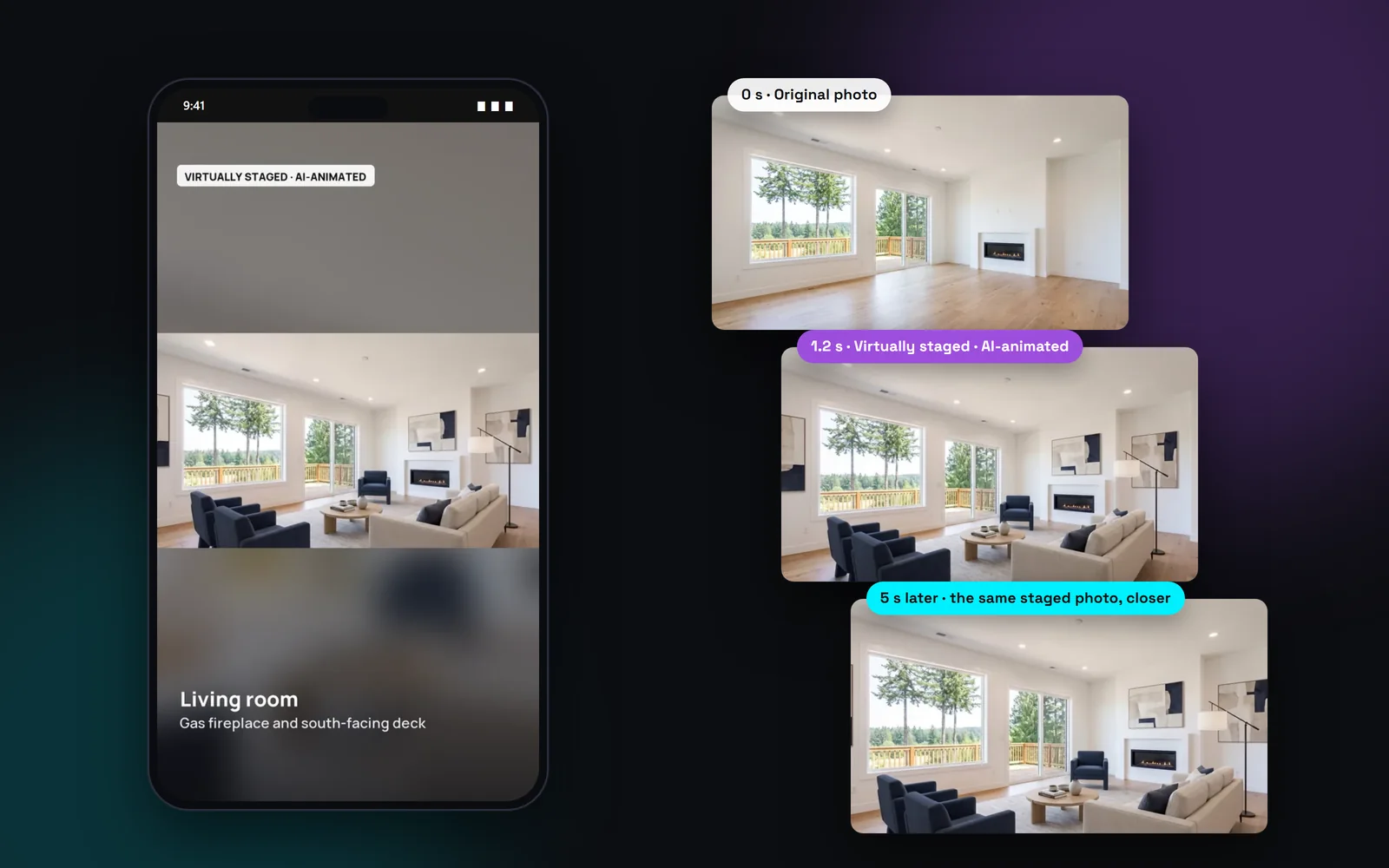
AI video tools can invent things. Ask for a camera move into a living room and you may get a sofa that isn't there or a window that moves. Trulisted pins each clip to the photo: the first frame is your photo, and the last frame is the same photo, slightly closer. The AI only fills in a smooth push-in between the two.
Then a motion check looks at a frame every half second. Each frame must sit inside the photo, at the same angle, and look like it.
Animate your staged, twilight and decluttered photos
An empty room isn't much to look at, even when the camera moves. If you've already virtually staged, decluttered or turned a photo to twilight, the cinematic scene animates that finished edit instead. Edit first, then pick it for a cinematic scene in your next run.
Because moving virtual furniture looks more real than a still photo, Trulisted adds extra steps to keep it honest:
- The original photo shows for about a second, tagged “Original”, then fades into the edit at the same framing.
- The animated edit carries its label the whole time it's on screen, such as “Virtually staged · AI-animated”, “Virtual twilight · AI-animated” or “Virtually decluttered · AI-animated”.
- The original photo stays on your Original Photos page, linked from the video's disclosure frame and QR code.
- Only edits that passed the honesty review can be animated. The motion check compares every frame with the edit itself.
- Renovation concepts and floor plans can't be animated.
What happens when a scene fails the check
A scene that doesn't pass gets one more try. If it still fails, it isn't stored and it isn't counted. That photo keeps the normal slow pan in your reel, so the video is still complete. You never have to sort through bad clips or pay for them. The reel waits for all its scenes before it's built, so it arrives finished.
Where cinematic scenes appear
Scenes play inside the listing videos Trulisted already makes for you:
- The 9:16 reel for Instagram Reels, TikTok and YouTube Shorts, where the wide clip sits on a blurred copy of the photo.
- The 16:9 video for YouTube, Facebook and your website, where the clip fills the frame.
- Each scene is about 5 seconds and silent. Add your own music from your brand kit, or add licensed music when you post.
- On the free first listing, the reel and video carry a faint trulisted.com mark in the corner.
Do you need to disclose AI video in real estate?
Movement made by AI isn't footage of the home, so Trulisted treats it like any other AI edit. An animated photo is tagged “AI-animated from a real photo” on screen, and an animated edit carries both labels, such as “Virtually staged · AI-animated”, right after the original photo. The video also includes a disclosure frame that explains it, with a link and QR code to the original photos when edited photos are shown.
California (AB 723, in force since January 1, 2026) requires a disclosure on or next to an altered image and a link to the unaltered original. Rules for AI video are still taking shape, so check your brokerage and MLS® board rules before you post.
From upload to download in minutes
- 01
Turn on the reel
Once your photos are ready, the Create tab shows the video step: tick the reel and then “Cinematic scenes”.
- 02
Pick up to 6 photos
Choose your strongest rooms. Photos you've already staged, decluttered or turned to twilight show with a badge. Each scene uses 2 credits.
- 03
We animate and check
Each photo becomes a 5-second camera push-in. A motion check compares the frames with the photo.
- 04
Post the reel
Passed scenes play in the 9:16 reel and the 16:9 video, labelled, with a disclosure frame. An animated edit comes right after the original photo.
Built to help you follow the rules
Every animated scene is labelled on screen: “AI-animated from a real photo”, or the edit's own label plus “AI-animated” for a staged, twilight or decluttered photo, which always follows its original. The video's disclosure frame explains what was animated and links the original photos. Clips are pinned to the photo at both ends and checked frame by frame, and a scene that fails the check isn't used. Read more: how to make a real estate video from photos.
How Trulisted handles compliance →Cinematic scenes: questions agents ask
How do I make a cinematic real estate video from photos?
Upload the listing photos and make your photo edits. Then, in the video step on the Create tab, tick the reel, turn on “Cinematic scenes” and pick up to 6 photos. Trulisted animates each one into a 5-second camera move and builds the reel around them.
How many credits does a cinematic scene use?
Two per scene. Scenes that fail the motion check aren't counted. The rest of the reel, the 16:9 video and the normal photo motion are free.
Will the AI add furniture or change the room?
The animation isn't meant to. That's what the motion check is for. Every half second, a frame is compared with your photo, and a clip that shows something outside the photo or drifts in angle is rejected. No check is perfect, so watch each scene before you post. Furniture only appears if you virtually staged the photo first, and then the scene is labelled “Virtually staged · AI-animated”.
Can I animate a virtually staged photo?
Yes. Stage it (or add twilight, or declutter it) first. In your next run, the cinematic picker shows that photo's finished edit with a badge. The video shows the original photo for about a second, then the animated edit with its label. Held-back edits can't be animated. It's still 2 credits a scene; the staging was counted when it was made.
Does the video have sound?
The scenes are silent. You can add a music track you have the rights to from your brand kit, or add music from the platform's library when you post.
How long is each cinematic scene?
About 5 seconds: a slow push-in toward the room. Up to 6 scenes can go in one reel.
Works well with
See all features →- Listing reel and video →A 9:16 reel and a 16:9 video from your photos, with optional cinematic AI scenes and a disclosure frame when it's needed.
- Social posts and stories →Feed posts, a carousel, stories and captions for Instagram, Facebook and LinkedIn.
- AI virtual staging →Furnish empty rooms in six styles, labelled, with the original photo linked.
- Compliance toolkit →Labels, original photos, an AI honesty review and wording checks, with draft rules for BC, Alberta, Ontario and California.
Try it on your next listing, free
Your first listing is free. No credit card needed.
Create your first listing free